Summit Health: Provider Scheduling & Browsing
Designed and built a comprehensive provider scheduling and browsing experience that enables patients to find, filter, and book appointments with providers, including unauthenticated scheduling and virtual visits, transforming how patients access care.
Overview
Summit Health (now VillageMD) serves patients through 2,000+ providers across 200+ locations in New Jersey, New York, and Central Oregon. This case study focuses on the provider scheduling and browsing experience: how patients find providers, check availability, and book appointments.
The challenge
Patients needed a better way to find and schedule appointments. The existing system required authentication to schedule, which blocked new patients from booking care. Limited filtering made it hard to find the right provider by specialty, location, or insurance network. Virtual visits weren't easily accessible despite growing demand for telehealth. As a result, patients were calling offices directly or abandoning the process altogether.
Key requirements
Scheduling capabilities
The user can schedule a visit with a doctor without being authenticated inside the app, enabling new patients to book appointments seamlessly. Users can schedule virtual visits with doctors, providing flexibility and accessibility. The system supports scheduling appointments up to 6 months in advance, giving patients the ability to plan ahead for routine care.
Provider discovery & filtering
Users can search for providers by name or specialty, filter providers by in-network or out-of-network status, view a provider's schedule up to 6 months out, and see both in-person and virtual visit availability. The system supports filtering by location, specialty (primary care, OB-GYN, behavioral health, gastroenterology, orthopedic, endocrinology, and more), insurance plan, and visit type.
Insurance management
Users can edit their insurance information by uploading a new insurance card or manually inputting insurance details. This ensures accurate network filtering and helps patients understand their coverage options when selecting providers.
Specialty-specific workflow design
The scheduling system needed to accommodate the unique requirements of different medical specialties. Each specialty has distinct rules for appointment types, patient eligibility, insurance coverage, and scheduling constraints. The interactive workflow visualization below shows how the system routes patients through different paths based on their status, visit type, and specialty-specific requirements.
New patients are directed to phone scheduling. Existing patients go through conditional routing based on treatment completion and visit type.
Patient Status Check
Have you been seen by Behavioral Health at Summit Health?
Phone Scheduling Required
New behavioral health appointments must be booked over the phone. Call 908-277-8900.
Treatment Completion Check
Have you completed the course of treatment recommended by your provider?
Visit Type Selection
Is this visit for therapy or medication management?
Schedule Appointment
Book with selected provider. Virtual or in-person options available.
Legend
Workflow complexity & conditional logic
These workflows demonstrate the complexity of healthcare scheduling. Each specialty has unique requirements: Behavioral Health distinguishes between new and existing patients with conditional routing based on treatment completion; Internal Medicine/Family Medicine includes emergency screening and COVID-19 protocols; Gastroenterology has separate paths for colonoscopy screenings and general visits; OBGYN includes age-based routing, pregnancy care scheduling with calculated dates, and specific rules for annual physicals. The system handles all these variations while maintaining a consistent user experience.
The complexity came from pre-authorization forms. Depending on what specialty you booked, users had to fill out different forms *before* seeing a provider's schedule. We used data from Tableau and legal requirements to map out what information was needed when, ensuring we collected everything upfront without overwhelming users.
The hard parts
Accommodating all types of users
The trickiest challenge was balancing existing patient relationships with flexibility. We always wanted to surface a patient's preferred doctor first, but for things like internal medicine, users needed the ability to see other providers if their doctor wasn't available. How do you prioritize without boxing people in?
We solved this by displaying a mix of providers with the user's preferred provider appearing first on the list. It sounds simple, but getting that logic right took iteration.
The unauthenticated scheduling debate
Letting people schedule without logging in was a group idea, but it was controversial at first. It felt radical. Introducing a "shopping experience" for unauthenticated users was different from how healthcare scheduling typically worked. But we wanted people to browse our providers and see their credentials and reviews, similar to ZocDoc. The goal was lowering barriers to care, especially for new patients.
The solution
We built a comprehensive scheduling experience that handles all these requirements while keeping the interface clean and patient-friendly. Users can search by specialty or provider name, filter by location, insurance network status, and visit type, view availability up to 6 months out, schedule both in-person and virtual visits, and complete the entire flow without authentication.
User flow
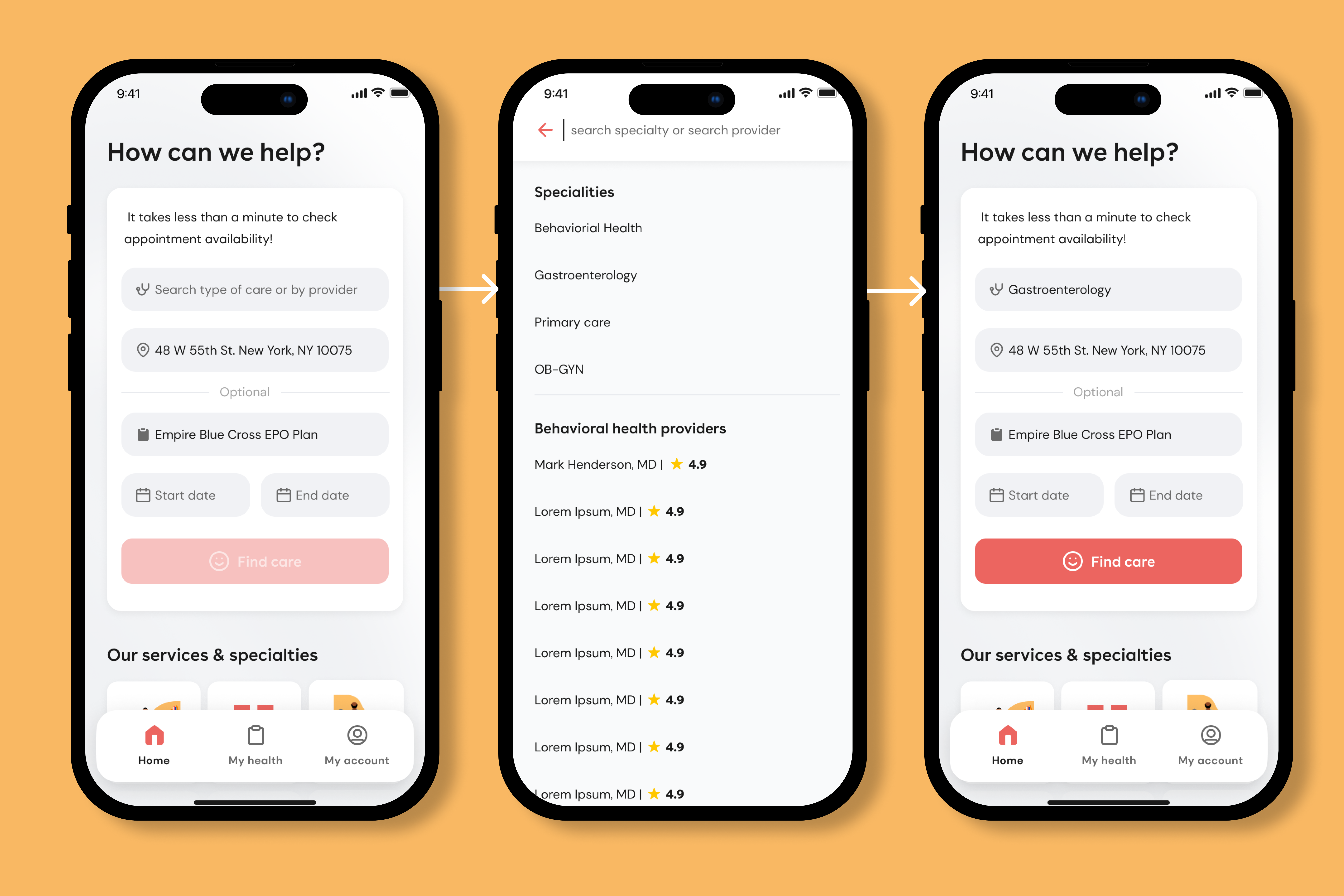
1. Initial search & specialty selection
The experience begins with a search interface that allows patients to search by type of care or provider name. Users can select from specialties like primary care, OB-GYN, behavioral health, gastroenterology, orthopedic, endocrinology, and more. Location-based search results show providers near the patient's location, with optional fields for insurance plan and date ranges to refine results.
2. Provider listing & filtering
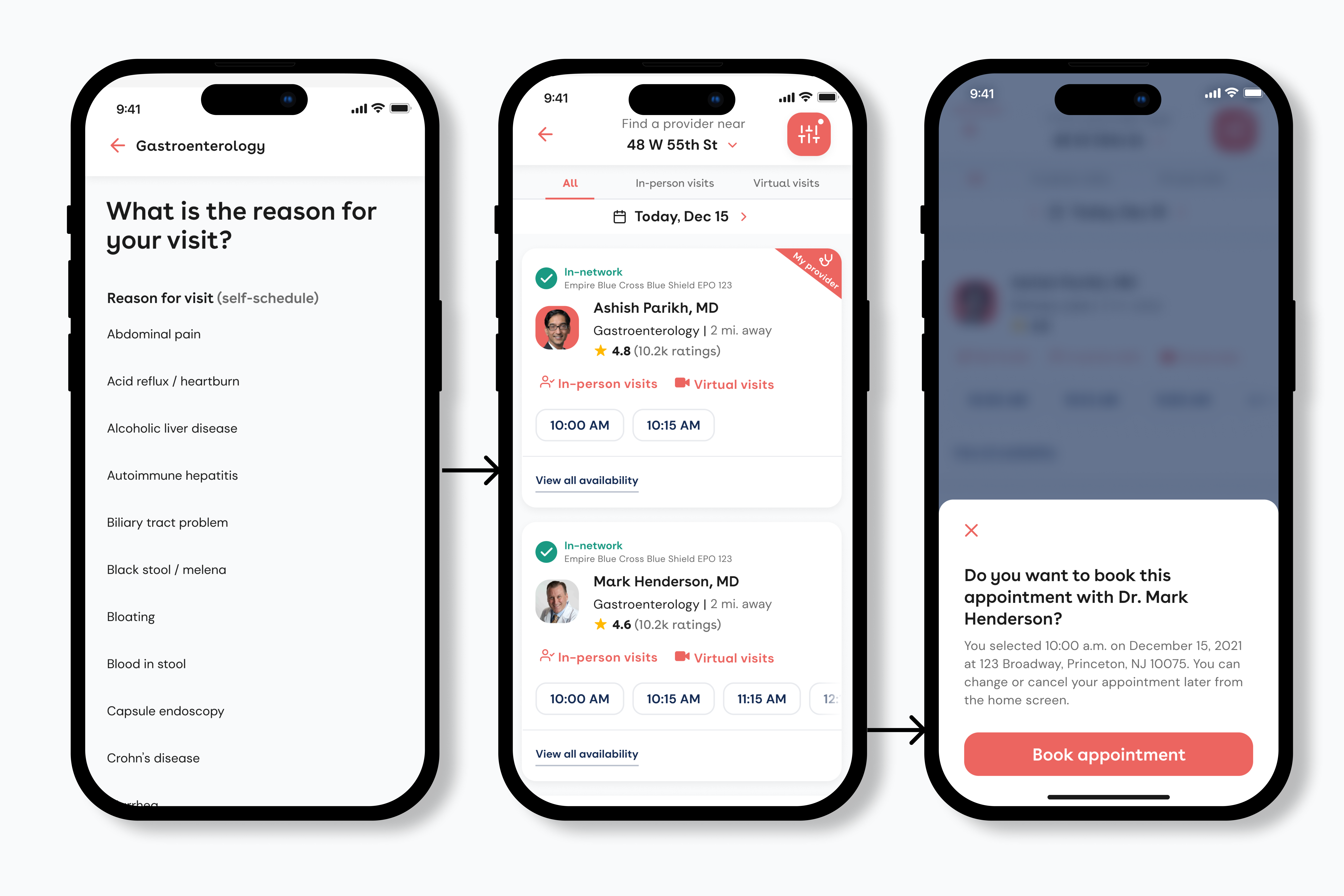
After selecting a specialty or searching, patients see a list of providers. Each card shows: provider name and credentials, specialty, distance, star ratings and review count, in-network or out-of-network status, and available appointment times (in-person and virtual).
For existing patients, we show a "My provider" tag and prioritize their established doctor at the top of the list while still displaying other options below.
Users can filter by "All," "In-person visits," or "Virtual visits" and adjust dates to see availability across different time periods.
3. Provider availability view
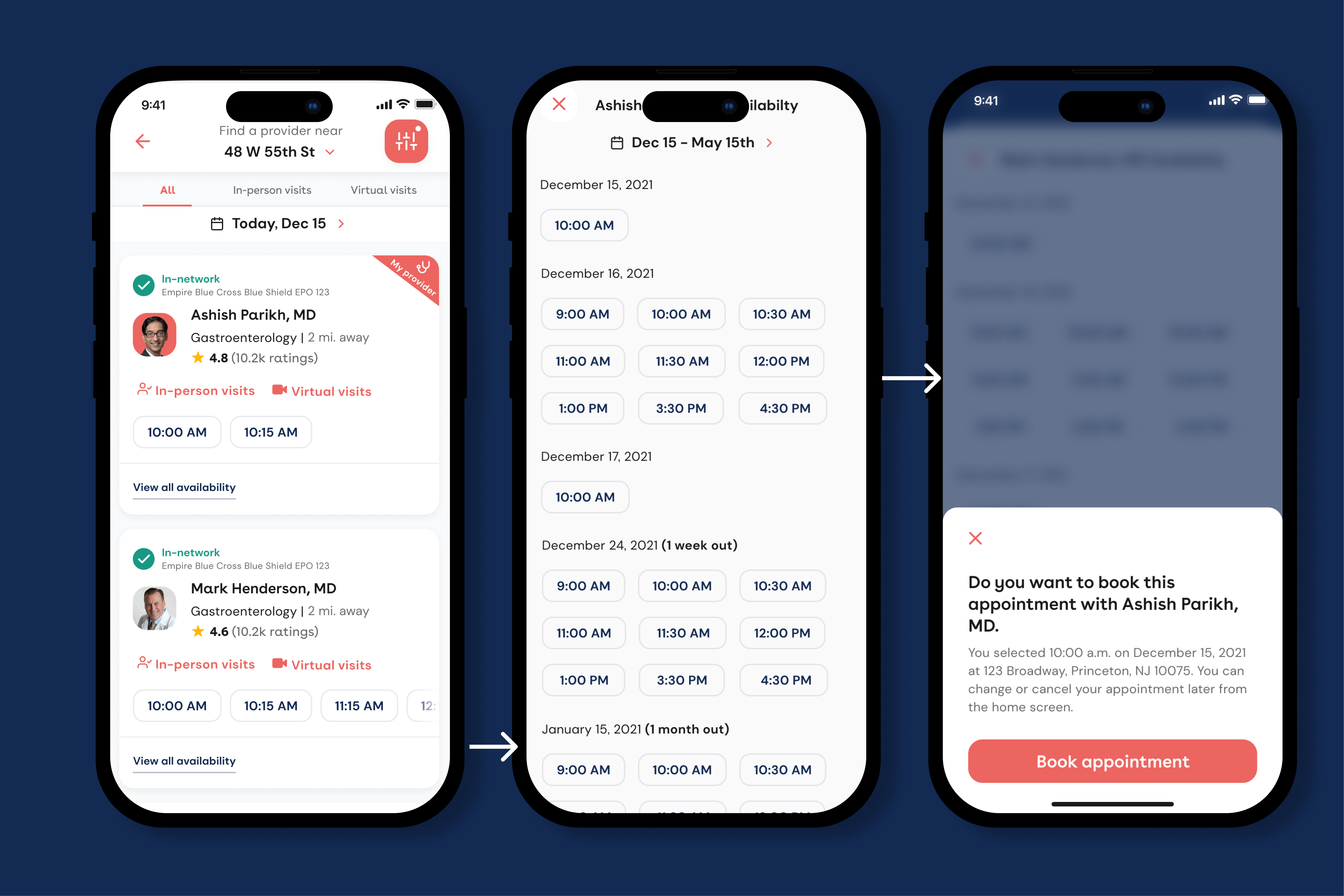
When patients select "View all availability" or click on a provider, they see a detailed calendar view showing availability up to 6 months in advance. The interface displays available time slots organized by date, with clear visual indication of selected times. Patients can navigate through dates to find the best appointment time that fits their schedule.
4. Pre-authorization forms (specialty-specific)
For certain specialties, patients fill out required forms before booking. This ensures providers have necessary information and that patients meet eligibility requirements. The forms vary by specialty based on Tableau data and legal requirements. What we ask for gastroenterology differs from what we need for behavioral health.
5. Appointment confirmation
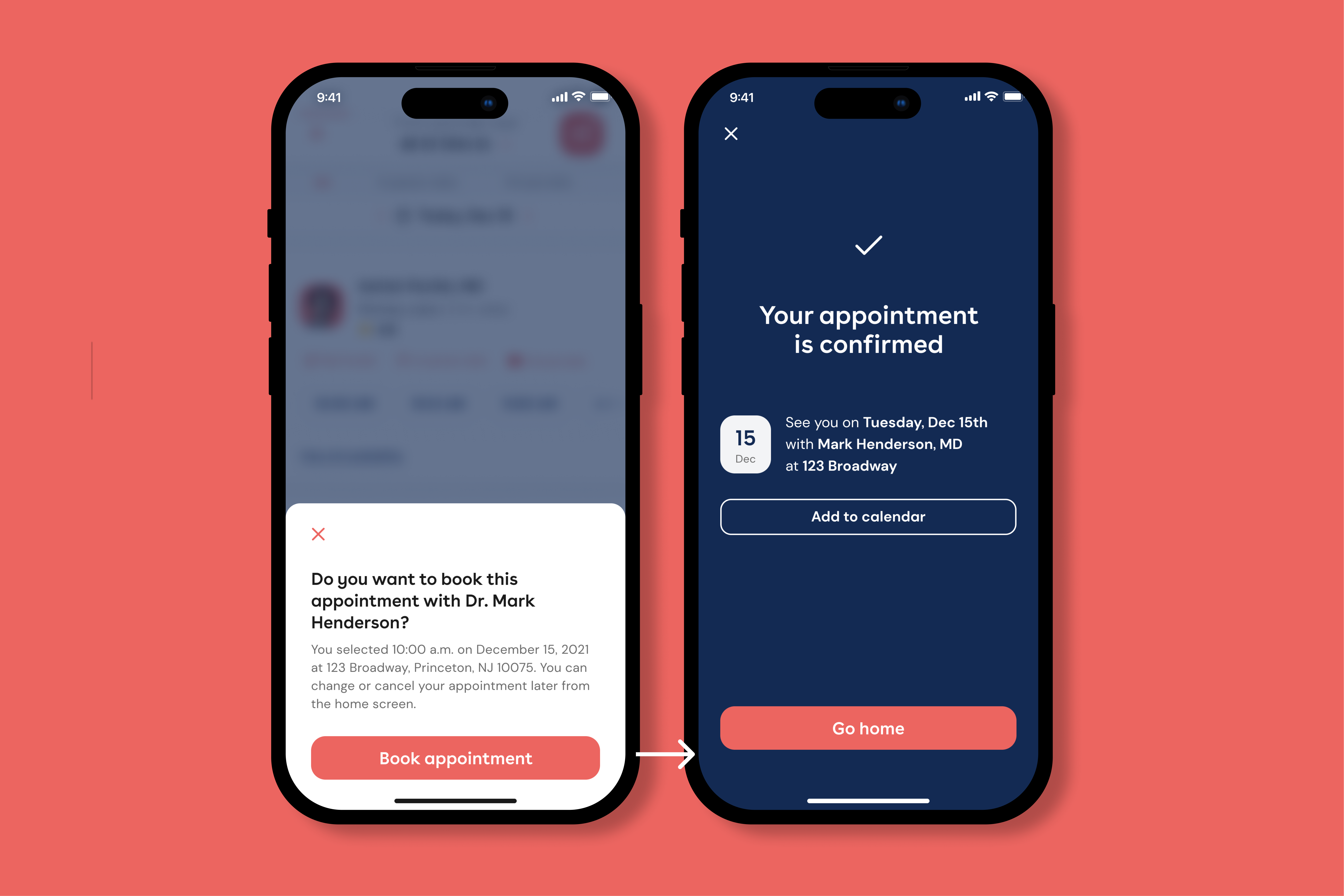
Before finalizing, patients see a confirmation modal with provider name, date and time, location (for in-person visits), and a note that they can change or cancel later. After confirming, they get a success screen with an option to add the appointment to their calendar.
Key features
Unauthenticated scheduling
One of the most significant innovations was enabling scheduling without requiring users to create an account or log in. This removes barriers for new patients and allows anyone to book an appointment, improving access to care. Users can complete the entire booking flow, from search to confirmation, without authentication.
Virtual visit support
The system seamlessly integrates virtual visit scheduling alongside in-person appointments. Providers who offer telehealth services have virtual visit time slots clearly marked, and patients can filter to show only virtual visits if preferred. This flexibility accommodates patient preferences and improves access, especially for follow-up appointments or when in-person visits are not necessary.
Network status filtering
Patients can see at a glance whether providers are in-network or out-of-network with their insurance plan. This transparency helps patients make informed decisions and avoid unexpected costs. The system displays insurance information (e.g., "Empire Blue Cross Blue Shield EPO 123") and clearly indicates network status with visual indicators like green checkmarks.
6-month availability calendar
Unlike many scheduling systems that show limited availability, this experience displays provider schedules up to 6 months in advance. This extended visibility enables patients to plan ahead for routine care, annual checkups, and follow-up appointments, reducing the need for last-minute scheduling and improving care continuity.
Insurance management
Patients can manage their insurance information directly in the app through two methods: uploading a new insurance card (using the device camera) or manually inputting insurance details. This ensures accurate network filtering and helps the system provide relevant provider recommendations based on coverage.
Design considerations
Provider cards prioritize the most important information: name, specialty, distance, and ratings are prominent. Network status and insurance are clearly visible. Available time slots appear directly on cards, reducing extra navigation.
The interface uses progressive disclosure: initial search shows high-level options, provider listings show key details and immediate availability, and detailed views reveal full schedules. This prevents information overload.
Time slots are large enough to tap easily on mobile. Confirmation modals use clear language and provide ways to go back, keeping users in control.
Impact & results
The provider scheduling and browsing experience successfully transformed how patients access care at Summit Health. By enabling unauthenticated scheduling, the system reduced barriers for new patients and improved access to care. Advanced filtering capabilities help patients find the right provider based on specialty, location, insurance network, and visit type. Extended availability visibility (6 months) enables better care planning, and seamless virtual visit scheduling accommodates patient preferences and improves accessibility. The system supports Summit Health's mission to provide connected care at patients' fingertips, making it easier for patients to find and book appointments with the organization's 2,000+ providers across primary care, OB-GYN, behavioral health, gastroenterology, orthopedic, endocrinology, and other specialties.
Integration with My Summit Health
This scheduling and browsing experience is part of the broader My Summit Health app ecosystem, which also includes features like finding walk-in urgent care with location-based search, completing intake forms ahead of time, accessing Athena-scheduled telehealth visits, getting on-demand virtual urgent care 24/7, tracking health and test results, managing prescriptions, viewing and making bill payments, and updating personal information and notification settings. The provider scheduling feature serves as a critical entry point for patients accessing Summit Health's comprehensive care network.