Lighthouse: Transforming Organizational Health Management
A comprehensive health management platform designed to help organizations protect their populations, maintain compliance with health protocols, and coordinate health events efficiently for the film and entertainment industry.
The challenge
Daybreak Health partnered with major entertainment companies across the U.S. film industry. Our research revealed that production companies were allocating significant portions of their budgets to COVID-19 compliance and testing operations. While a California Film Commission study found that major productions spent between 5-6.5% of their budgets on COVID protocols, real-world costs frequently reached 10-30% of total budgets, especially for productions involving travel and quarantine requirements.
The financial stakes were enormous. Films with budgets over $60 million allocated an average of $5.6 million to COVID compliance alone. For smaller productions, the burden was equally significant—a six-week shoot with 23 crew members could spend 12% of the entire budget just on testing.
When outbreaks occurred, the costs multiplied. Production shutdowns meant paying entire crews while idle, then rehiring once filming could resume—costs that could exceed 10% of total production budgets or hundreds of thousands of dollars per incident. For some productions, added precautions and protocols added approximately $120,000 per week to operating costs.
During a conversation with a line producer, we identified a critical gap: there was no centralized system to track testing status, view results for cast and crew, or manage isolation protocols. Without visibility into their population's health status, productions were operating blind—unable to prevent outbreaks or respond quickly when they occurred. This insight became the catalyst for Lighthouse.
Financial impact
Films with budgets over $60 million allocated an average of $5.6 million to COVID compliance alone. For smaller productions, a six-week shoot with 23 crew members could spend 12% of the entire budget just on testing. When outbreaks occurred, production shutdowns meant paying entire crews while idle, then rehiring once filming could resume—costs that could exceed 10% of total production budgets or hundreds of thousands of dollars per incident.
The solution
Lighthouse provided three core capabilities: Clinical Guidance & Support for access to expert-reviewed guidelines and educational materials, Compliance Dashboard for monitoring organization-wide health protocol compliance through intuitive dashboards, and Event Coordination for scheduling and managing health events to provide employees with timely access to necessary care.
User groups
The platform serves four distinct user classes:
Employers & people managers
- Line producers and PA coordinators (TV/Film) - School principals (Education) - COVID compliance officers - HR managers - C-suite executives
Patients/participants
- Union and non-union film/TV personnel (Zone A, B, C classifications) - Students and teachers - Hotel staff and guests - Event staff (concerts, live events, theater, sporting events)
Clinical staff (Daybreak Health)
- Nurses - Primary care physicians - EMTs - Health coaches
Operations team
- Daybreak Health operations staff who approve and coordinate events
Key features
Feature map
High-level product backlog for Lighthouse V1, organized by functional area: sign-up and account creation, account management, home and patient list (testing), messaging, education, billing, and risk modeling.
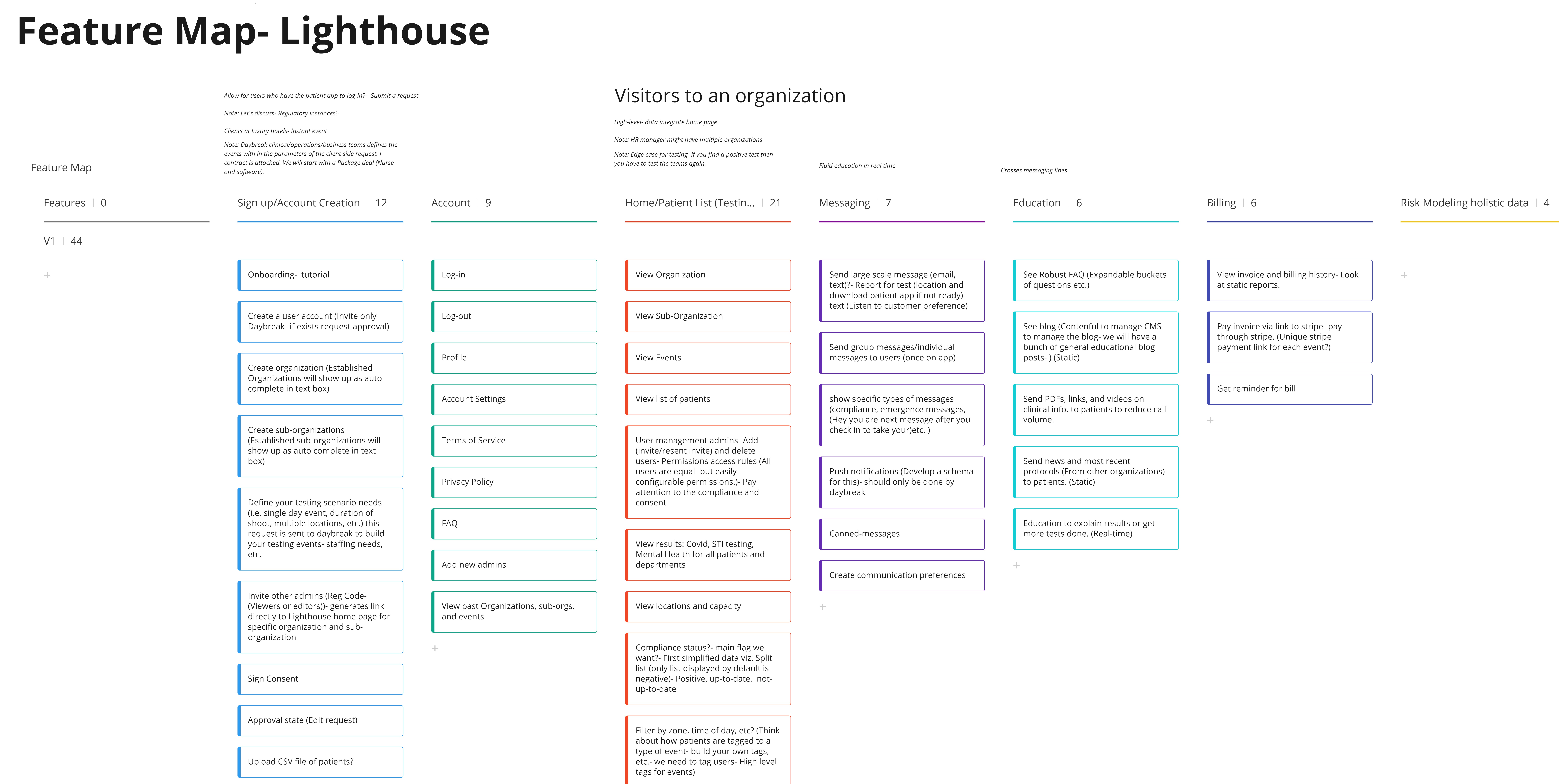
Interactive board (same structure as the map above):
Sign up / Account Creation
12 features
Account
9 features
Home / Patient List (Testing...)
21 features
Messaging
7 features
Education
6 features
Billing
6 features
Risk Modeling holistic data
4 features
—
'use client'
import React from 'react'
const FEATURE_COLUMNS = [
{
title: 'Sign up / Account Creation',
count: 12,
items: [
'Onboarding - tutorial',
'Create a user account (Invite only Daybreak - if exists request approval)',
'Create organization (Established Organizations show as autocomplete)',
'Create sub-organizations (Established sub-orgs show as autocomplete)',
'Define your testing scenario needs (single day event, duration of shoot, multiple locations, etc.) - request sent to Daybreak to build testing events, staffing, etc.',
'Invite other admins (Reg Code - Viewers or editors) - generates link to Lighthouse home for specific organization and sub-organization',
'Sign Consent',
'Approval state (Edit request)',
'Upload CSV file of patients?',
],
},
{
title: 'Account',
count: 9,
items: [
'Log-in',
'Log-out',
'Profile',
'Account Settings',
'Terms of Service',
'Privacy Policy',
'FAQ',
'Add new admins',
'View past Organizations, sub-orgs, and events',
],
},
{
title: 'Home / Patient List (Testing...)',
count: 21,
items: [
'View Organization',
'View Sub-Organization',
'View Events',
'View list of patients',
'User management admins - Add (invite/resend invite) and delete users - Permissions access rules (All users equal - easily configurable). Compliance and consent',
'View results: Covid, STI testing, Mental Health for all patients and departments',
'View locations and capacity',
'Compliance status? - main flag - First simplified data viz. Split list (default: negative). Positive, up-to-date, not-up-to-date',
'Filter by zone, time of day, etc.? (Tag users - High level tags for events)',
],
},
{
title: 'Messaging',
count: 7,
items: [
'Send large scale message (email, text)? - Report for test (location and download patient app). Listen to customer preference',
'Send group messages / individual messages to users (once on app)',
'Show specific types of messages (compliance, emergency, e.g. "You are next" after check-in)',
'Push notifications (Schema - should only be done by Daybreak)',
'Canned messages',
'Create communication preferences',
],
},
{
title: 'Education',
count: 6,
items: [
'See Robust FAQ (Expandable buckets of questions)',
'See blog (Contentful CMS - general educational blog posts) (Static)',
'Send PDFs, links, and videos on clinical info. to patients to reduce call volume',
'Send news and most recent protocols (From other organizations) to patients. (Static)',
'Education to explain results or get more tests done. (Real-time)',
],
},
{
title: 'Billing',
count: 6,
items: [
'View invoice and billing history - Static reports',
'Pay invoice via link to Stripe (Unique Stripe payment link per event?)',
'Get reminder for bill',
],
},
{
title: 'Risk Modeling holistic data',
count: 4,
items: [],
},
]
export default function LighthouseFeatureMap() {
return (
<div className="w-full overflow-x-auto pb-4">
<div className="inline-flex gap-4 min-w-max pr-4" style={{ minHeight: '320px' }}>
{FEATURE_COLUMNS.map((col) => (
<div
key={col.title}
className="flex-shrink-0 w-[280px] rounded-xl border border-[var(--border)] bg-[var(--bg-surface)] shadow-sm overflow-hidden flex flex-col"
>
<div className="px-4 py-3 border-b border-[var(--border)] bg-[var(--bg-primary)]/50">
<h3 className="text-sm font-semibold text-[var(--text-primary)] leading-tight">
{col.title}
</h3>
<p className="text-xs text-[var(--text-secondary)] mt-0.5">
{col.count} {col.count === 1 ? 'feature' : 'features'}
</p>
</div>
<div className="flex-1 overflow-y-auto p-3 space-y-2">
{col.items.length > 0 ? (
col.items.map((item, i) => (
<div
key={i}
className="text-xs text-[var(--text-primary)] bg-[var(--bg-primary)]/60 border border-[var(--border)] rounded-lg px-3 py-2 leading-snug"
>
{item}
</div>
))
) : (
<p className="text-xs text-[var(--text-secondary)] italic py-2">—</p>
)}
</div>
</div>
))}
</div>
</div>
)
}
Onboarding & setup
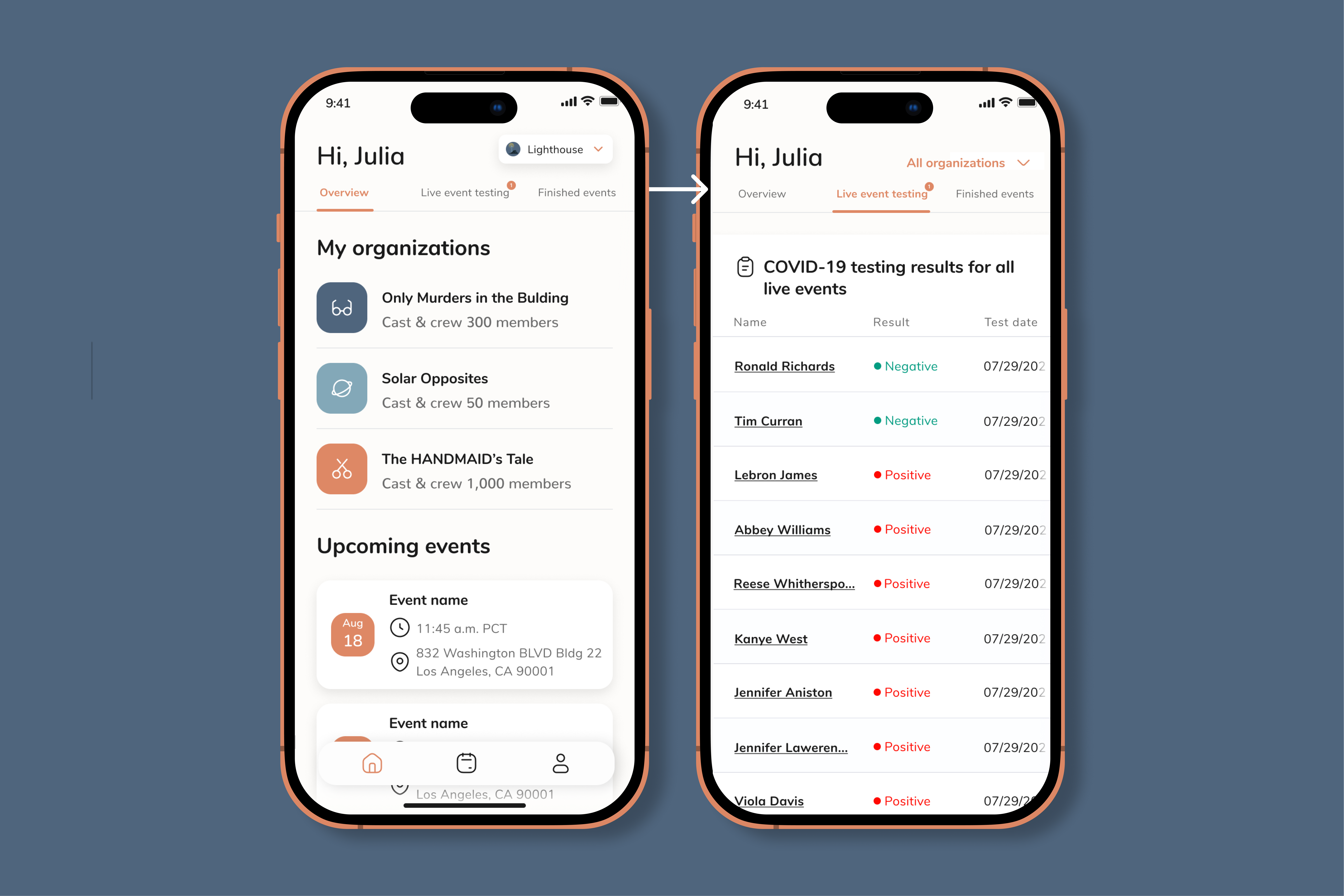
Admin login with role-based access, comprehensive profile creation with testing location preferences (on-site, at-home PCR, or both), organization creation and volume estimation, and testing event configuration with patient assignment.
Dashboard & monitoring (web)
Multi-organization view for admins managing multiple entities, real-time testing event overview, high-level compliance dashboard highlighting at-risk patients, and quick navigation to organization-specific details.
Compliance dashboard
Monitor organization-wide health protocol compliance
At risk individuals
3| Name | Role | Issue | Last test | Status | Actions |
|---|---|---|---|---|---|
| Sarah Johnson | Cinematographer | Test expired 3 days ago | 2024-02-12 | Overdue | |
| Michael Chen | Sound Engineer | Pending test result | 2024-02-15 | Pending | |
| Emma Rodriguez | Production Assistant | Test expired 1 day ago | 2024-02-14 | Overdue |
Recent testing events
'use client'
import React, { useState } from 'react';
import { TrendingUp, Users, AlertCircle, CheckCircle2, Clock, Mail } from 'lucide-react';
export default function LighthouseDashboard() {
const [selectedOrg, setSelectedOrg] = useState('Avengers Production');
const organizations = [
{ name: 'Avengers Production', tests: 145, atRisk: 3, compliant: 142 },
{ name: 'WandaVision', tests: 89, atRisk: 1, compliant: 88 },
{ name: 'Restaurant Chain A', tests: 234, atRisk: 5, compliant: 229 },
];
const atRiskIndividuals = {
'Avengers Production': [
{ name: 'Sarah Johnson', role: 'Cinematographer', reason: 'Test expired 3 days ago', lastTest: '2024-02-12', status: 'overdue' },
{ name: 'Michael Chen', role: 'Sound Engineer', reason: 'Pending test result', lastTest: '2024-02-15', status: 'pending' },
{ name: 'Emma Rodriguez', role: 'Production Assistant', reason: 'Test expired 1 day ago', lastTest: '2024-02-14', status: 'overdue' },
],
'WandaVision': [
{ name: 'David Park', role: 'Actor', reason: 'Test expired 2 days ago', lastTest: '2024-02-13', status: 'overdue' },
],
'Restaurant Chain A': [
{ name: 'James Wilson', role: 'Head Chef', reason: 'Test expired 5 days ago', lastTest: '2024-02-10', status: 'overdue' },
{ name: 'Lisa Thompson', role: 'Server', reason: 'Pending test result', lastTest: '2024-02-15', status: 'pending' },
{ name: 'Robert Martinez', role: 'Manager', reason: 'Test expired 2 days ago', lastTest: '2024-02-13', status: 'overdue' },
{ name: 'Jennifer Lee', role: 'Server', reason: 'Pending test result', lastTest: '2024-02-15', status: 'pending' },
{ name: 'Thomas Brown', role: 'Cook', reason: 'Test expired 1 day ago', lastTest: '2024-02-14', status: 'overdue' },
],
};
const selectedOrgData = organizations.find(org => org.name === selectedOrg) || organizations[0];
const selectedAtRisk = atRiskIndividuals[selectedOrg as keyof typeof atRiskIndividuals] || [];
return (
<div style={{
padding: '24px',
backgroundColor: '#FFFFFF',
borderRadius: '8px',
fontFamily: '"DM Sans", -apple-system, BlinkMacSystemFont, sans-serif',
maxWidth: '1200px',
}}>
{/* Header */}
<div style={{ marginBottom: '24px' }}>
<h2 style={{
fontSize: '24px',
fontWeight: '600',
color: '#1A1A1A',
marginBottom: '8px',
}}>
Compliance dashboard
</h2>
<p style={{
fontSize: '14px',
color: '#6B6B6B',
}}>
Monitor organization-wide health protocol compliance
</p>
</div>
{/* Organization Selector */}
<div style={{
display: 'flex',
gap: '12px',
marginBottom: '24px',
flexWrap: 'wrap',
}}>
{organizations.map((org) => (
<button
key={org.name}
onClick={() => setSelectedOrg(org.name)}
style={{
padding: '10px 16px',
borderRadius: '8px',
border: selectedOrg === org.name ? '2px solid #132A53' : '1px solid #E5E7EB',
backgroundColor: selectedOrg === org.name ? '#F0F4F8' : '#FFFFFF',
color: selectedOrg === org.name ? '#132A53' : '#6B6B6B',
fontSize: '14px',
fontWeight: selectedOrg === org.name ? '600' : '400',
cursor: 'pointer',
transition: 'all 0.2s ease',
}}
>
{org.name}
</button>
))}
</div>
{/* Stats Grid */}
<div style={{
display: 'grid',
gridTemplateColumns: 'repeat(auto-fit, minmax(200px, 1fr))',
gap: '16px',
marginBottom: '24px',
}}>
<div style={{
padding: '20px',
backgroundColor: '#F9FAFB',
borderRadius: '8px',
border: '1px solid #E5E7EB',
}}>
<div style={{
display: 'flex',
alignItems: 'center',
gap: '8px',
marginBottom: '8px',
}}>
<Users size={18} color="#6B6B6B" />
<span style={{
fontSize: '12px',
color: '#6B6B6B',
fontWeight: '500',
}}>
Total tests
</span>
</div>
<div style={{
fontSize: '32px',
fontWeight: '600',
color: '#1A1A1A',
}}>
{selectedOrgData.tests}
</div>
</div>
<div style={{
padding: '20px',
backgroundColor: '#FEF2F2',
borderRadius: '8px',
border: '1px solid #FECACA',
}}>
<div style={{
display: 'flex',
alignItems: 'center',
gap: '8px',
marginBottom: '8px',
}}>
<AlertCircle size={18} color="#DC2626" />
<span style={{
fontSize: '12px',
color: '#DC2626',
fontWeight: '500',
}}>
At risk
</span>
</div>
<div style={{
fontSize: '32px',
fontWeight: '600',
color: '#DC2626',
}}>
{selectedOrgData.atRisk}
</div>
</div>
<div style={{
padding: '20px',
backgroundColor: '#F0FDF4',
borderRadius: '8px',
border: '1px solid #BBF7D0',
}}>
<div style={{
display: 'flex',
alignItems: 'center',
gap: '8px',
marginBottom: '8px',
}}>
<CheckCircle2 size={18} color="#059669" />
<span style={{
fontSize: '12px',
color: '#059669',
fontWeight: '500',
}}>
Compliant
</span>
</div>
<div style={{
fontSize: '32px',
fontWeight: '600',
color: '#059669',
}}>
{selectedOrgData.compliant}
</div>
</div>
<div style={{
padding: '20px',
backgroundColor: '#F9FAFB',
borderRadius: '8px',
border: '1px solid #E5E7EB',
}}>
<div style={{
display: 'flex',
alignItems: 'center',
gap: '8px',
marginBottom: '8px',
}}>
<TrendingUp size={18} color="#6B6B6B" />
<span style={{
fontSize: '12px',
color: '#6B6B6B',
fontWeight: '500',
}}>
Compliance rate
</span>
</div>
<div style={{
fontSize: '32px',
fontWeight: '600',
color: '#1A1A1A',
}}>
{Math.round((selectedOrgData.compliant / selectedOrgData.tests) * 100)}%
</div>
</div>
</div>
{/* At Risk Individuals Table */}
{selectedAtRisk.length > 0 && (
<div style={{
padding: '20px',
backgroundColor: '#FFFFFF',
borderRadius: '8px',
border: '1px solid #E5E7EB',
marginBottom: '24px',
}}>
<div style={{
display: 'flex',
alignItems: 'center',
gap: '8px',
marginBottom: '20px',
}}>
<AlertCircle size={20} color="#DC2626" />
<h3 style={{
fontSize: '18px',
fontWeight: '600',
color: '#1A1A1A',
}}>
At risk individuals
</h3>
<span style={{
padding: '2px 8px',
borderRadius: '12px',
fontSize: '12px',
fontWeight: '600',
backgroundColor: '#FEF2F2',
color: '#DC2626',
}}>
{selectedAtRisk.length}
</span>
</div>
{/* Table */}
<div style={{
overflowX: 'auto',
}}>
<table style={{
width: '100%',
borderCollapse: 'collapse',
}}>
<thead>
<tr style={{
borderBottom: '1px solid #E5E7EB',
}}>
<th style={{
textAlign: 'left',
padding: '12px 16px',
fontSize: '12px',
fontWeight: '600',
color: '#6B6B6B',
textTransform: 'uppercase',
letterSpacing: '0.5px',
}}>Name</th>
<th style={{
textAlign: 'left',
padding: '12px 16px',
fontSize: '12px',
fontWeight: '600',
color: '#6B6B6B',
textTransform: 'uppercase',
letterSpacing: '0.5px',
}}>Role</th>
<th style={{
textAlign: 'left',
padding: '12px 16px',
fontSize: '12px',
fontWeight: '600',
color: '#6B6B6B',
textTransform: 'uppercase',
letterSpacing: '0.5px',
}}>Issue</th>
<th style={{
textAlign: 'left',
padding: '12px 16px',
fontSize: '12px',
fontWeight: '600',
color: '#6B6B6B',
textTransform: 'uppercase',
letterSpacing: '0.5px',
}}>Last test</th>
<th style={{
textAlign: 'left',
padding: '12px 16px',
fontSize: '12px',
fontWeight: '600',
color: '#6B6B6B',
textTransform: 'uppercase',
letterSpacing: '0.5px',
}}>Status</th>
<th style={{
textAlign: 'right',
padding: '12px 16px',
fontSize: '12px',
fontWeight: '600',
color: '#6B6B6B',
textTransform: 'uppercase',
letterSpacing: '0.5px',
}}>Actions</th>
</tr>
</thead>
<tbody>
{selectedAtRisk.map((person, idx) => (
<tr
key={idx}
style={{
borderBottom: idx < selectedAtRisk.length - 1 ? '1px solid #F3F4F6' : 'none',
transition: 'background-color 0.2s',
}}
onMouseEnter={(e) => {
e.currentTarget.style.backgroundColor = '#F9FAFB';
}}
onMouseLeave={(e) => {
e.currentTarget.style.backgroundColor = 'transparent';
}}
>
<td style={{
padding: '16px',
fontSize: '14px',
fontWeight: '600',
color: '#1A1A1A',
}}>
{person.name}
</td>
<td style={{
padding: '16px',
fontSize: '14px',
color: '#6B6B6B',
}}>
{person.role}
</td>
<td style={{
padding: '16px',
fontSize: '14px',
color: '#1A1A1A',
}}>
{person.reason}
</td>
<td style={{
padding: '16px',
fontSize: '14px',
color: '#6B6B6B',
}}>
<div style={{
display: 'flex',
alignItems: 'center',
gap: '6px',
}}>
<Clock size={14} color="#6B6B6B" />
{person.lastTest}
</div>
</td>
<td style={{
padding: '16px',
}}>
<span style={{
padding: '4px 12px',
borderRadius: '12px',
fontSize: '12px',
fontWeight: '600',
backgroundColor: person.status === 'overdue' ? '#FEF2F2' : '#FEF3C7',
color: person.status === 'overdue' ? '#DC2626' : '#D97706',
}}>
{person.status === 'overdue' ? 'Overdue' : 'Pending'}
</span>
</td>
<td style={{
padding: '16px',
textAlign: 'right',
}}>
<div style={{
display: 'flex',
gap: '8px',
justifyContent: 'flex-end',
}}>
<button
style={{
padding: '6px 12px',
borderRadius: '6px',
border: '1px solid #E5E7EB',
backgroundColor: '#FFFFFF',
color: '#132A53',
fontSize: '12px',
fontWeight: '500',
cursor: 'pointer',
display: 'flex',
alignItems: 'center',
gap: '6px',
transition: 'all 0.2s',
}}
onMouseEnter={(e) => {
e.currentTarget.style.backgroundColor = '#F3F4F6';
e.currentTarget.style.borderColor = '#132A53';
}}
onMouseLeave={(e) => {
e.currentTarget.style.backgroundColor = '#FFFFFF';
e.currentTarget.style.borderColor = '#E5E7EB';
}}
>
<Mail size={14} />
Contact
</button>
</div>
</td>
</tr>
))}
</tbody>
</table>
</div>
</div>
)}
{/* Recent Events */}
<div style={{
padding: '20px',
backgroundColor: '#F9FAFB',
borderRadius: '8px',
border: '1px solid #E5E7EB',
}}>
<h3 style={{
fontSize: '16px',
fontWeight: '600',
color: '#1A1A1A',
marginBottom: '16px',
}}>
Recent testing events
</h3>
<div style={{
display: 'flex',
flexDirection: 'column',
gap: '12px',
}}>
{[
{ name: 'Zone A Testing', date: '2024-02-15', participants: 45, status: 'Completed' },
{ name: 'Weekly PCR Screening', date: '2024-02-14', participants: 32, status: 'In Progress' },
{ name: 'Pre-Production Testing', date: '2024-02-13', participants: 68, status: 'Completed' },
].map((event, idx) => (
<div
key={idx}
style={{
display: 'flex',
justifyContent: 'space-between',
alignItems: 'center',
padding: '12px',
backgroundColor: '#FFFFFF',
borderRadius: '6px',
border: '1px solid #E5E7EB',
}}
>
<div>
<div style={{
fontSize: '14px',
fontWeight: '600',
color: '#1A1A1A',
marginBottom: '4px',
}}>
{event.name}
</div>
<div style={{
fontSize: '12px',
color: '#6B6B6B',
}}>
{event.date} • {event.participants} participants
</div>
</div>
<span style={{
padding: '4px 12px',
borderRadius: '12px',
fontSize: '12px',
fontWeight: '600',
backgroundColor: event.status === 'Completed' ? '#ECFDF5' : '#FEF3C7',
color: event.status === 'Completed' ? '#059669' : '#D97706',
}}>
{event.status}
</span>
</div>
))}
</div>
</div>
</div>
);
}
Results management
Patient list view organized within testing events, advanced filtering (name, test type, results status, timestamp), individual patient result details (positive, negative, pending), direct communication options (text/email to patient or Daybreak Health), and COVID-19 result tracking (extensible for additional test types).
Event coordination
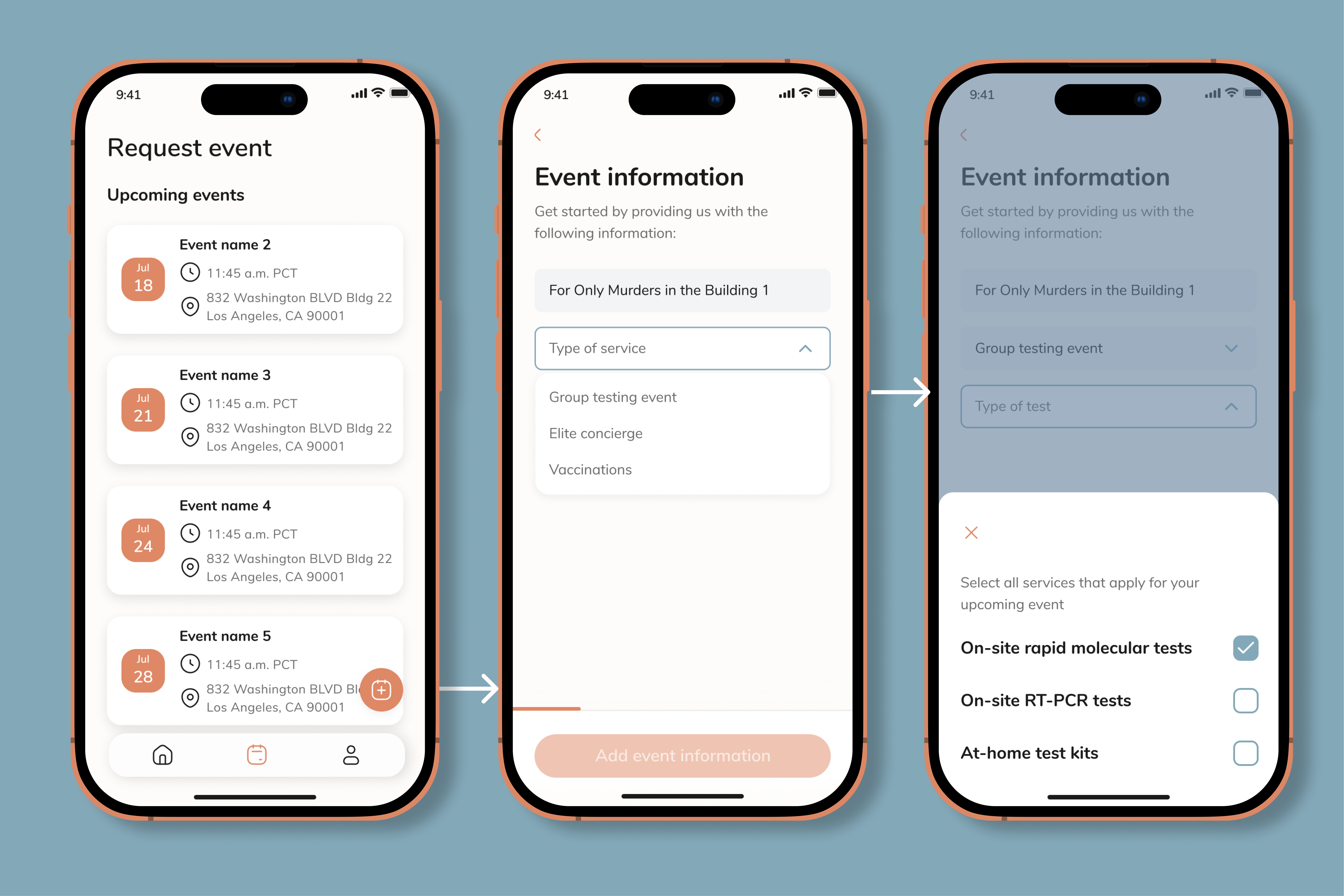
Event request submission with 24-48 hour approval workflow and operations team review and approval process.
Request new event
Fill in the basic details for your testing event
'use client'
import React, { useState, useRef, useEffect } from 'react';
import { Calendar, MapPin, Users, Clock, CheckCircle2, ChevronDown } from 'lucide-react';
export default function LighthouseEventRequest() {
const [step, setStep] = useState(1);
const [formData, setFormData] = useState({
eventName: '',
organization: '',
customOrganization: '',
organizationType: '',
street: '',
streetNumber: '',
city: '',
state: '',
zipCode: '',
date: '',
participants: '',
testType: 'PCR',
});
const [isCustomOrgMode, setIsCustomOrgMode] = useState(false);
const [isOrgDropdownOpen, setIsOrgDropdownOpen] = useState(false);
const [isOrgTypeDropdownOpen, setIsOrgTypeDropdownOpen] = useState(false);
const [isTestTypeDropdownOpen, setIsTestTypeDropdownOpen] = useState(false);
const orgDropdownRef = useRef<HTMLDivElement>(null);
const orgTypeDropdownRef = useRef<HTMLDivElement>(null);
const testTypeDropdownRef = useRef<HTMLDivElement>(null);
const organizations = [
{ value: 'avengers', label: 'Avengers Production' },
{ value: 'wandavision', label: 'WandaVision' },
{ value: 'restaurant', label: 'Restaurant Chain A' },
];
const organizationTypes = [
{ value: 'film', label: 'Film' },
{ value: 'broadway', label: 'Broadway' },
{ value: 'television', label: 'Television' },
{ value: 'event', label: 'Event' },
{ value: 'other', label: 'Other' },
];
const testTypes = [
{ value: 'PCR', label: 'PCR' },
{ value: 'Rapid', label: 'Rapid Antigen' },
{ value: 'Both', label: 'Both' },
];
useEffect(() => {
const handleClickOutside = (e: MouseEvent) => {
if (orgDropdownRef.current && !orgDropdownRef.current.contains(e.target as Node)) {
setIsOrgDropdownOpen(false);
}
if (orgTypeDropdownRef.current && !orgTypeDropdownRef.current.contains(e.target as Node)) {
setIsOrgTypeDropdownOpen(false);
}
if (testTypeDropdownRef.current && !testTypeDropdownRef.current.contains(e.target as Node)) {
setIsTestTypeDropdownOpen(false);
}
};
document.addEventListener('mousedown', handleClickOutside);
return () => document.removeEventListener('mousedown', handleClickOutside);
}, []);
const handleInputChange = (field: string, value: string) => {
setFormData(prev => ({ ...prev, [field]: value }));
};
const handleNext = () => {
if (step < 4) {
setStep(step + 1);
}
};
const handleSubmit = () => {
setStep(5);
};
if (step === 5) {
return (
<div style={{
padding: '40px',
backgroundColor: '#FFFFFF',
borderRadius: '8px',
fontFamily: '"DM Sans", -apple-system, BlinkMacSystemFont, sans-serif',
width: '100%',
textAlign: 'center',
}}>
<div style={{
width: '64px',
height: '64px',
borderRadius: '50%',
backgroundColor: '#ECFDF5',
display: 'flex',
alignItems: 'center',
justifyContent: 'center',
margin: '0 auto 24px',
}}>
<CheckCircle2 size={32} color="#059669" />
</div>
<h2 style={{
fontSize: '24px',
fontWeight: '600',
color: '#1A1A1A',
marginBottom: '12px',
}}>
Event request submitted
</h2>
<p style={{
fontSize: '14px',
color: '#6B6B6B',
marginBottom: '24px',
lineHeight: '1.6',
}}>
Your event request has been submitted successfully. The operations team will review and approve your request within 24-48 hours. You'll receive a notification once it's been processed.
</p>
<button
onClick={() => {
setStep(1);
setFormData({
eventName: '',
organization: '',
customOrganization: '',
organizationType: '',
street: '',
streetNumber: '',
city: '',
state: '',
zipCode: '',
date: '',
participants: '',
testType: 'PCR',
});
setIsCustomOrgMode(false);
}}
style={{
padding: '12px 24px',
backgroundColor: '#132A53',
color: '#FFFFFF',
border: 'none',
borderRadius: '8px',
fontSize: '14px',
fontWeight: '600',
cursor: 'pointer',
}}
>
Create another event
</button>
</div>
);
}
const selectedOrg = organizations.find(org => org.value === formData.organization);
const selectedTestType = testTypes.find(type => type.value === formData.testType);
// Validation functions for each step
const isStep1Valid = () => {
return formData.eventName.trim() !== '' && (formData.organization !== '' || formData.customOrganization.trim() !== '');
};
const isStep2Valid = () => {
return formData.organizationType !== '' &&
formData.streetNumber.trim() !== '' &&
formData.street.trim() !== '' &&
formData.city.trim() !== '' &&
formData.state.trim() !== '' &&
formData.zipCode.trim() !== '' &&
formData.testType !== '';
};
const isStep3Valid = () => {
return formData.date !== '' && formData.participants.trim() !== '';
};
return (
<div style={{
padding: '32px',
backgroundColor: '#FFFFFF',
borderRadius: '8px',
fontFamily: '"DM Sans", -apple-system, BlinkMacSystemFont, sans-serif',
width: '100%',
minHeight: '600px',
position: 'relative',
}}>
{/* Progress Indicator */}
<div style={{
display: 'flex',
alignItems: 'center',
marginBottom: '32px',
gap: '8px',
width: '100%',
}}>
{[1, 2, 3, 4].map((s) => (
<React.Fragment key={s}>
<div style={{
width: '32px',
height: '32px',
borderRadius: '50%',
backgroundColor: step >= s ? '#132A53' : '#E5E7EB',
color: step >= s ? '#FFFFFF' : '#6B6B6B',
display: 'flex',
alignItems: 'center',
justifyContent: 'center',
fontSize: '14px',
fontWeight: '600',
flexShrink: 0,
}}>
{step > s ? '✓' : s}
</div>
{s < 4 && (
<div style={{
flex: 1,
height: '2px',
backgroundColor: step > s ? '#132A53' : '#E5E7EB',
transition: 'background-color 0.3s ease',
}} />
)}
</React.Fragment>
))}
</div>
<h2 style={{
fontSize: '24px',
fontWeight: '600',
color: '#1A1A1A',
marginBottom: '8px',
}}>
{step === 1 ? 'Request new event' : step === 2 ? 'Event details' : step === 3 ? 'Schedule & participants' : 'Review & submit'}
</h2>
<p style={{
fontSize: '14px',
color: '#6B6B6B',
marginBottom: '24px',
}}>
{step === 1 ? 'Fill in the basic details for your testing event' : step === 2 ? 'Add location and test type information' : step === 3 ? 'Set schedule and participant count' : 'Review your event details before submitting'}
</p>
{step === 1 ? (
<div style={{ display: 'flex', flexDirection: 'column', gap: '20px' }}>
<div>
<label style={{
display: 'block',
fontSize: '14px',
fontWeight: '500',
color: '#1A1A1A',
marginBottom: '8px',
}}>
Event name
</label>
<input
type="text"
value={formData.eventName}
onChange={(e) => handleInputChange('eventName', e.target.value)}
placeholder="e.g., Zone A Weekly Testing"
style={{
width: '100%',
padding: '12px 16px',
border: '1px solid #E5E7EB',
borderRadius: '8px',
fontSize: '14px',
boxSizing: 'border-box',
}}
/>
</div>
<div ref={orgDropdownRef} style={{ position: 'relative' }}>
<label style={{
display: 'block',
fontSize: '14px',
fontWeight: '500',
color: '#1A1A1A',
marginBottom: '8px',
}}>
Select organization
</label>
{!isCustomOrgMode ? (
<>
<button
type="button"
onClick={() => setIsOrgDropdownOpen(!isOrgDropdownOpen)}
style={{
width: '100%',
padding: '12px 16px',
border: '1px solid #E5E7EB',
borderRadius: '8px',
fontSize: '14px',
backgroundColor: '#FFFFFF',
color: (selectedOrg || formData.customOrganization) ? '#1A1A1A' : '#9CA3AF',
textAlign: 'left',
cursor: 'pointer',
display: 'flex',
alignItems: 'center',
justifyContent: 'space-between',
boxSizing: 'border-box',
}}
>
<span>{selectedOrg ? selectedOrg.label : formData.customOrganization || 'Select organization'}</span>
<ChevronDown size={16} color="#6B6B6B" style={{ transform: isOrgDropdownOpen ? 'rotate(180deg)' : 'none', transition: 'transform 0.2s' }} />
</button>
{isOrgDropdownOpen && (
<div style={{
position: 'absolute',
top: '100%',
left: 0,
right: 0,
marginTop: '4px',
backgroundColor: '#FFFFFF',
border: '1px solid #E5E7EB',
borderRadius: '8px',
boxShadow: '0 4px 12px rgba(0, 0, 0, 0.1)',
zIndex: 10,
overflow: 'hidden',
}}>
{organizations.map((org) => (
<button
key={org.value}
type="button"
onClick={() => {
handleInputChange('organization', org.value);
handleInputChange('customOrganization', '');
setIsCustomOrgMode(false);
setIsOrgDropdownOpen(false);
}}
style={{
width: '100%',
padding: '12px 16px',
textAlign: 'left',
fontSize: '14px',
color: '#1A1A1A',
backgroundColor: formData.organization === org.value ? '#F3F4F6' : '#FFFFFF',
border: 'none',
cursor: 'pointer',
transition: 'background-color 0.2s',
}}
onMouseEnter={(e) => {
if (formData.organization !== org.value) {
e.currentTarget.style.backgroundColor = '#F9FAFB';
}
}}
onMouseLeave={(e) => {
if (formData.organization !== org.value) {
e.currentTarget.style.backgroundColor = '#FFFFFF';
}
}}
>
{org.label}
</button>
))}
<button
type="button"
onClick={() => {
setIsCustomOrgMode(true);
handleInputChange('organization', '');
setIsOrgDropdownOpen(false);
}}
style={{
width: '100%',
padding: '12px 16px',
textAlign: 'left',
fontSize: '14px',
color: '#132A53',
backgroundColor: '#FFFFFF',
border: 'none',
borderTop: '1px solid #E5E7EB',
cursor: 'pointer',
transition: 'background-color 0.2s',
}}
onMouseEnter={(e) => {
e.currentTarget.style.backgroundColor = '#F9FAFB';
}}
onMouseLeave={(e) => {
e.currentTarget.style.backgroundColor = '#FFFFFF';
}}
>
+ Add new organization
</button>
</div>
)}
</>
) : (
<div style={{ display: 'flex', flexDirection: 'column', gap: '8px' }}>
<input
type="text"
value={formData.customOrganization}
onChange={(e) => handleInputChange('customOrganization', e.target.value)}
placeholder="Enter organization name"
style={{
width: '100%',
padding: '12px 16px',
border: '1px solid #E5E7EB',
borderRadius: '8px',
fontSize: '14px',
boxSizing: 'border-box',
}}
/>
<button
type="button"
onClick={() => {
setIsCustomOrgMode(false);
handleInputChange('customOrganization', '');
}}
style={{
padding: '6px 12px',
backgroundColor: 'transparent',
color: '#6B6B6B',
border: 'none',
borderRadius: '6px',
fontSize: '12px',
fontWeight: '500',
cursor: 'pointer',
alignSelf: 'flex-start',
}}
onMouseEnter={(e) => {
e.currentTarget.style.backgroundColor = '#F3F4F6';
e.currentTarget.style.color = '#1A1A1A';
}}
onMouseLeave={(e) => {
e.currentTarget.style.backgroundColor = 'transparent';
e.currentTarget.style.color = '#6B6B6B';
}}
>
← Back to list
</button>
</div>
)}
</div>
<div style={{ display: 'flex', justifyContent: 'space-between', alignItems: 'center', marginTop: '24px' }}>
<div style={{ width: '80px' }} /> {/* Spacer for alignment */}
<button
onClick={handleNext}
disabled={!isStep1Valid()}
style={{
padding: '8px 16px',
backgroundColor: isStep1Valid() ? '#132A53' : '#E5E7EB',
color: isStep1Valid() ? '#FFFFFF' : '#9CA3AF',
border: 'none',
borderRadius: '6px',
fontSize: '14px',
fontWeight: '500',
cursor: isStep1Valid() ? 'pointer' : 'not-allowed',
transition: 'all 0.2s ease',
}}
>
Continue
</button>
</div>
</div>
) : step === 2 ? (
<div style={{ display: 'flex', flexDirection: 'column', gap: '20px' }}>
<div ref={orgTypeDropdownRef} style={{ position: 'relative' }}>
<label style={{
display: 'block',
fontSize: '14px',
fontWeight: '500',
color: '#1A1A1A',
marginBottom: '8px',
}}>
Organization type
</label>
<button
type="button"
onClick={() => setIsOrgTypeDropdownOpen(!isOrgTypeDropdownOpen)}
style={{
width: '100%',
padding: '12px 16px',
border: '1px solid #E5E7EB',
borderRadius: '8px',
fontSize: '14px',
backgroundColor: '#FFFFFF',
color: formData.organizationType ? '#1A1A1A' : '#9CA3AF',
textAlign: 'left',
cursor: 'pointer',
display: 'flex',
alignItems: 'center',
justifyContent: 'space-between',
boxSizing: 'border-box',
}}
>
<span>{formData.organizationType ? organizationTypes.find(t => t.value === formData.organizationType)?.label : 'Select organization type'}</span>
<ChevronDown size={16} color="#6B6B6B" style={{ transform: isOrgTypeDropdownOpen ? 'rotate(180deg)' : 'none', transition: 'transform 0.2s' }} />
</button>
{isOrgTypeDropdownOpen && (
<div style={{
position: 'absolute',
top: '100%',
left: 0,
right: 0,
marginTop: '4px',
backgroundColor: '#FFFFFF',
border: '1px solid #E5E7EB',
borderRadius: '8px',
boxShadow: '0 4px 12px rgba(0, 0, 0, 0.1)',
zIndex: 10,
overflow: 'hidden',
}}>
{organizationTypes.map((type) => (
<button
key={type.value}
type="button"
onClick={() => {
handleInputChange('organizationType', type.value);
setIsOrgTypeDropdownOpen(false);
}}
style={{
width: '100%',
padding: '12px 16px',
textAlign: 'left',
fontSize: '14px',
color: '#1A1A1A',
backgroundColor: formData.organizationType === type.value ? '#F3F4F6' : '#FFFFFF',
border: 'none',
cursor: 'pointer',
transition: 'background-color 0.2s',
}}
onMouseEnter={(e) => {
if (formData.organizationType !== type.value) {
e.currentTarget.style.backgroundColor = '#F9FAFB';
}
}}
onMouseLeave={(e) => {
if (formData.organizationType !== type.value) {
e.currentTarget.style.backgroundColor = '#FFFFFF';
}
}}
>
{type.label}
</button>
))}
</div>
)}
</div>
<div>
<label style={{
display: 'block',
fontSize: '14px',
fontWeight: '500',
color: '#1A1A1A',
marginBottom: '8px',
}}>
Street number
</label>
<input
type="text"
value={formData.streetNumber}
onChange={(e) => handleInputChange('streetNumber', e.target.value)}
placeholder="Enter street number"
style={{
width: '100%',
padding: '12px 16px',
border: '1px solid #E5E7EB',
borderRadius: '8px',
fontSize: '14px',
boxSizing: 'border-box',
}}
/>
</div>
<div>
<label style={{
display: 'block',
fontSize: '14px',
fontWeight: '500',
color: '#1A1A1A',
marginBottom: '8px',
}}>
Street
</label>
<input
type="text"
value={formData.street}
onChange={(e) => handleInputChange('street', e.target.value)}
placeholder="Enter street name"
style={{
width: '100%',
padding: '12px 16px',
border: '1px solid #E5E7EB',
borderRadius: '8px',
fontSize: '14px',
boxSizing: 'border-box',
}}
/>
</div>
<div style={{ display: 'grid', gridTemplateColumns: '1fr 1fr', gap: '16px' }}>
<div>
<label style={{
display: 'block',
fontSize: '14px',
fontWeight: '500',
color: '#1A1A1A',
marginBottom: '8px',
}}>
City
</label>
<input
type="text"
value={formData.city}
onChange={(e) => handleInputChange('city', e.target.value)}
placeholder="Enter city"
style={{
width: '100%',
padding: '12px 16px',
border: '1px solid #E5E7EB',
borderRadius: '8px',
fontSize: '14px',
boxSizing: 'border-box',
}}
/>
</div>
<div>
<label style={{
display: 'block',
fontSize: '14px',
fontWeight: '500',
color: '#1A1A1A',
marginBottom: '8px',
}}>
State
</label>
<input
type="text"
value={formData.state}
onChange={(e) => handleInputChange('state', e.target.value)}
placeholder="Enter state"
style={{
width: '100%',
padding: '12px 16px',
border: '1px solid #E5E7EB',
borderRadius: '8px',
fontSize: '14px',
boxSizing: 'border-box',
}}
/>
</div>
</div>
<div>
<label style={{
display: 'block',
fontSize: '14px',
fontWeight: '500',
color: '#1A1A1A',
marginBottom: '8px',
}}>
Zip code
</label>
<input
type="text"
value={formData.zipCode}
onChange={(e) => handleInputChange('zipCode', e.target.value)}
placeholder="Enter zip code"
style={{
width: '100%',
padding: '12px 16px',
border: '1px solid #E5E7EB',
borderRadius: '8px',
fontSize: '14px',
boxSizing: 'border-box',
}}
/>
</div>
<div ref={testTypeDropdownRef} style={{ position: 'relative' }}>
<label style={{
display: 'block',
fontSize: '14px',
fontWeight: '500',
color: '#1A1A1A',
marginBottom: '8px',
}}>
Test type
</label>
<button
type="button"
onClick={() => setIsTestTypeDropdownOpen(!isTestTypeDropdownOpen)}
style={{
width: '100%',
padding: '12px 16px',
border: '1px solid #E5E7EB',
borderRadius: '8px',
fontSize: '14px',
backgroundColor: '#FFFFFF',
color: selectedTestType ? '#1A1A1A' : '#9CA3AF',
textAlign: 'left',
cursor: 'pointer',
display: 'flex',
alignItems: 'center',
justifyContent: 'space-between',
boxSizing: 'border-box',
}}
>
<span>{selectedTestType ? selectedTestType.label : 'Select test type'}</span>
<ChevronDown size={16} color="#6B6B6B" style={{ transform: isTestTypeDropdownOpen ? 'rotate(180deg)' : 'none', transition: 'transform 0.2s' }} />
</button>
{isTestTypeDropdownOpen && (
<div style={{
position: 'absolute',
top: '100%',
left: 0,
right: 0,
marginTop: '4px',
backgroundColor: '#FFFFFF',
border: '1px solid #E5E7EB',
borderRadius: '8px',
boxShadow: '0 4px 12px rgba(0, 0, 0, 0.1)',
zIndex: 10,
overflow: 'hidden',
}}>
{testTypes.map((type) => (
<button
key={type.value}
type="button"
onClick={() => {
handleInputChange('testType', type.value);
setIsTestTypeDropdownOpen(false);
}}
style={{
width: '100%',
padding: '12px 16px',
textAlign: 'left',
fontSize: '14px',
color: '#1A1A1A',
backgroundColor: formData.testType === type.value ? '#F3F4F6' : '#FFFFFF',
border: 'none',
cursor: 'pointer',
transition: 'background-color 0.2s',
}}
onMouseEnter={(e) => {
if (formData.testType !== type.value) {
e.currentTarget.style.backgroundColor = '#F9FAFB';
}
}}
onMouseLeave={(e) => {
if (formData.testType !== type.value) {
e.currentTarget.style.backgroundColor = '#FFFFFF';
}
}}
>
{type.label}
</button>
))}
</div>
)}
</div>
<div style={{ display: 'flex', justifyContent: 'space-between', alignItems: 'center', marginTop: '24px' }}>
<button
onClick={() => setStep(1)}
style={{
padding: '6px 12px',
backgroundColor: 'transparent',
color: '#6B6B6B',
border: 'none',
borderRadius: '6px',
fontSize: '14px',
fontWeight: '500',
cursor: 'pointer',
}}
onMouseEnter={(e) => {
e.currentTarget.style.backgroundColor = '#F3F4F6';
e.currentTarget.style.color = '#1A1A1A';
}}
onMouseLeave={(e) => {
e.currentTarget.style.backgroundColor = 'transparent';
e.currentTarget.style.color = '#6B6B6B';
}}
>
← Back
</button>
<button
onClick={handleNext}
disabled={!isStep2Valid()}
style={{
padding: '8px 16px',
backgroundColor: isStep2Valid() ? '#132A53' : '#E5E7EB',
color: isStep2Valid() ? '#FFFFFF' : '#9CA3AF',
border: 'none',
borderRadius: '6px',
fontSize: '14px',
fontWeight: '500',
cursor: isStep2Valid() ? 'pointer' : 'not-allowed',
transition: 'all 0.2s ease',
}}
>
Continue
</button>
</div>
</div>
) : step === 3 ? (
<div style={{ display: 'flex', flexDirection: 'column', gap: '20px' }}>
<div>
<label style={{
display: 'block',
fontSize: '14px',
fontWeight: '500',
color: '#1A1A1A',
marginBottom: '8px',
}}>
Event date
</label>
<input
type="date"
value={formData.date}
onChange={(e) => handleInputChange('date', e.target.value)}
style={{
width: '100%',
padding: '12px 16px',
border: '1px solid #E5E7EB',
borderRadius: '8px',
fontSize: '14px',
boxSizing: 'border-box',
}}
/>
</div>
<div>
<label style={{
display: 'block',
fontSize: '14px',
fontWeight: '500',
color: '#1A1A1A',
marginBottom: '8px',
}}>
Expected participants
</label>
<input
type="number"
value={formData.participants}
onChange={(e) => handleInputChange('participants', e.target.value)}
placeholder="Enter number of participants"
style={{
width: '100%',
padding: '12px 16px',
border: '1px solid #E5E7EB',
borderRadius: '8px',
fontSize: '14px',
boxSizing: 'border-box',
}}
/>
</div>
<div style={{ display: 'flex', justifyContent: 'space-between', alignItems: 'center', marginTop: '24px' }}>
<button
onClick={() => setStep(2)}
style={{
padding: '6px 12px',
backgroundColor: 'transparent',
color: '#6B6B6B',
border: 'none',
borderRadius: '6px',
fontSize: '14px',
fontWeight: '500',
cursor: 'pointer',
}}
onMouseEnter={(e) => {
e.currentTarget.style.backgroundColor = '#F3F4F6';
e.currentTarget.style.color = '#1A1A1A';
}}
onMouseLeave={(e) => {
e.currentTarget.style.backgroundColor = 'transparent';
e.currentTarget.style.color = '#6B6B6B';
}}
>
← Back
</button>
<button
onClick={handleNext}
disabled={!isStep3Valid()}
style={{
padding: '8px 16px',
backgroundColor: isStep3Valid() ? '#132A53' : '#E5E7EB',
color: isStep3Valid() ? '#FFFFFF' : '#9CA3AF',
border: 'none',
borderRadius: '6px',
fontSize: '14px',
fontWeight: '500',
cursor: isStep3Valid() ? 'pointer' : 'not-allowed',
transition: 'all 0.2s ease',
}}
>
Continue
</button>
</div>
</div>
) : (
<div>
<div style={{
display: 'flex',
flexDirection: 'column',
gap: '16px',
marginBottom: '24px',
padding: '20px',
backgroundColor: '#F9FAFB',
borderRadius: '8px',
}}>
<div style={{ display: 'flex', alignItems: 'center', gap: '12px' }}>
<Calendar size={18} color="#6B6B6B" />
<div>
<div style={{ fontSize: '12px', color: '#6B6B6B' }}>Event name</div>
<div style={{ fontSize: '14px', fontWeight: '600', color: '#1A1A1A' }}>
{formData.eventName || 'Zone A Weekly Testing'}
</div>
</div>
</div>
<div style={{ display: 'flex', alignItems: 'center', gap: '12px' }}>
<Users size={18} color="#6B6B6B" />
<div>
<div style={{ fontSize: '12px', color: '#6B6B6B' }}>Organization</div>
<div style={{ fontSize: '14px', fontWeight: '600', color: '#1A1A1A' }}>
{selectedOrg ? selectedOrg.label : formData.customOrganization || 'Avengers Production'}
</div>
</div>
</div>
{formData.organizationType && (
<div style={{ display: 'flex', alignItems: 'center', gap: '12px' }}>
<Users size={18} color="#6B6B6B" />
<div>
<div style={{ fontSize: '12px', color: '#6B6B6B' }}>Organization type</div>
<div style={{ fontSize: '14px', fontWeight: '600', color: '#1A1A1A' }}>
{organizationTypes.find(t => t.value === formData.organizationType)?.label || formData.organizationType}
</div>
</div>
</div>
)}
{(formData.streetNumber || formData.street || formData.city || formData.state || formData.zipCode) && (
<div style={{ display: 'flex', alignItems: 'flex-start', gap: '12px' }}>
<MapPin size={18} color="#6B6B6B" style={{ marginTop: '2px' }} />
<div>
<div style={{ fontSize: '12px', color: '#6B6B6B', marginBottom: '4px' }}>Address</div>
<div style={{ fontSize: '14px', fontWeight: '600', color: '#1A1A1A', lineHeight: '1.5' }}>
{[formData.streetNumber, formData.street].filter(Boolean).join(' ')}
{formData.city && <><br />{formData.city}</>}
{formData.state && <>, {formData.state}</>}
{formData.zipCode && <> {formData.zipCode}</>}
</div>
</div>
</div>
)}
<div style={{ display: 'flex', alignItems: 'center', gap: '12px' }}>
<Clock size={18} color="#6B6B6B" />
<div>
<div style={{ fontSize: '12px', color: '#6B6B6B' }}>Test type</div>
<div style={{ fontSize: '14px', fontWeight: '600', color: '#1A1A1A' }}>
{selectedTestType ? selectedTestType.label : formData.testType}
</div>
</div>
</div>
{formData.date && (
<div style={{ display: 'flex', alignItems: 'center', gap: '12px' }}>
<Calendar size={18} color="#6B6B6B" />
<div>
<div style={{ fontSize: '12px', color: '#6B6B6B' }}>Event date</div>
<div style={{ fontSize: '14px', fontWeight: '600', color: '#1A1A1A' }}>
{new Date(formData.date).toLocaleDateString()}
</div>
</div>
</div>
)}
{formData.participants && (
<div style={{ display: 'flex', alignItems: 'center', gap: '12px' }}>
<Users size={18} color="#6B6B6B" />
<div>
<div style={{ fontSize: '12px', color: '#6B6B6B' }}>Expected participants</div>
<div style={{ fontSize: '14px', fontWeight: '600', color: '#1A1A1A' }}>
{formData.participants}
</div>
</div>
</div>
)}
</div>
<div style={{ display: 'flex', justifyContent: 'space-between', alignItems: 'center' }}>
<button
onClick={() => setStep(3)}
style={{
padding: '6px 12px',
backgroundColor: 'transparent',
color: '#6B6B6B',
border: 'none',
borderRadius: '6px',
fontSize: '14px',
fontWeight: '500',
cursor: 'pointer',
}}
onMouseEnter={(e) => {
e.currentTarget.style.backgroundColor = '#F3F4F6';
e.currentTarget.style.color = '#1A1A1A';
}}
onMouseLeave={(e) => {
e.currentTarget.style.backgroundColor = 'transparent';
e.currentTarget.style.color = '#6B6B6B';
}}
>
← Back
</button>
<button
onClick={handleSubmit}
disabled={!isStep1Valid() || !isStep2Valid() || !isStep3Valid()}
style={{
padding: '8px 16px',
backgroundColor: (isStep1Valid() && isStep2Valid() && isStep3Valid()) ? '#132A53' : '#E5E7EB',
color: (isStep1Valid() && isStep2Valid() && isStep3Valid()) ? '#FFFFFF' : '#9CA3AF',
border: 'none',
borderRadius: '6px',
fontSize: '14px',
fontWeight: '500',
cursor: (isStep1Valid() && isStep2Valid() && isStep3Valid()) ? 'pointer' : 'not-allowed',
transition: 'all 0.2s ease',
}}
>
Submit request
</button>
</div>
</div>
)}
</div>
);
}
Mobile app view for requesting an event.
Components
Date range picker
A calendar component for selecting date ranges, used throughout the platform for scheduling events and filtering results by time periods.
'use client'
import React, { useState, useRef, useEffect } from 'react';
import { ChevronLeft, ChevronRight, ChevronDown } from 'lucide-react';
export default function LighthouseDateRangePicker() {
const [currentView, setCurrentView] = useState(new Date());
const [selectedStart, setSelectedStart] = useState<Date | null>(null);
const [selectedEnd, setSelectedEnd] = useState<Date | null>(null);
const [hoverDate, setHoverDate] = useState<Date | null>(null);
const [isYearDropdownOpen, setIsYearDropdownOpen] = useState(false);
const yearDropdownRef = useRef<HTMLDivElement>(null);
const monthNames = ['January', 'February', 'March', 'April', 'May', 'June', 'July', 'August', 'September', 'October', 'November', 'December'];
const dayNames = ['Mo', 'Tu', 'We', 'Th', 'Fr', 'Sa', 'Su'];
// Get years for dropdown (current year ± 5 years)
const getYears = () => {
const currentYear = new Date().getFullYear();
const years = [];
for (let i = -5; i <= 5; i++) {
years.push(currentYear + i);
}
return years;
};
// Get months to display in the left panel (just the 12 months of the selected year)
const getMonthList = () => {
const months = [];
const year = currentView.getFullYear();
for (let i = 0; i < 12; i++) {
months.push(new Date(year, i, 1));
}
return months;
};
useEffect(() => {
const handleClickOutside = (e: MouseEvent) => {
if (yearDropdownRef.current && !yearDropdownRef.current.contains(e.target as Node)) {
setIsYearDropdownOpen(false);
}
};
document.addEventListener('mousedown', handleClickOutside);
return () => document.removeEventListener('mousedown', handleClickOutside);
}, []);
const getDaysInMonth = (date: Date) => {
const year = date.getFullYear();
const month = date.getMonth();
const firstDay = new Date(year, month, 1);
const lastDay = new Date(year, month + 1, 0);
const daysInMonth = lastDay.getDate();
const startingDayOfWeek = firstDay.getDay();
// Adjust for Monday as first day (0 = Sunday, so we shift)
const adjustedStart = startingDayOfWeek === 0 ? 6 : startingDayOfWeek - 1;
const days = [];
// Empty cells for days before month starts
for (let i = 0; i < adjustedStart; i++) {
days.push(null);
}
// Days of the month
for (let i = 1; i <= daysInMonth; i++) {
days.push(new Date(year, month, i));
}
return days;
};
const handleDateClick = (date: Date) => {
if (!selectedStart || (selectedStart && selectedEnd)) {
setSelectedStart(date);
setSelectedEnd(null);
} else if (selectedStart && !selectedEnd) {
if (date < selectedStart) {
setSelectedEnd(selectedStart);
setSelectedStart(date);
} else {
setSelectedEnd(date);
}
}
};
const normalizeDate = (date: Date) => {
const normalized = new Date(date);
normalized.setHours(0, 0, 0, 0);
return normalized;
};
const isInRange = (date: Date) => {
if (!selectedStart) return false;
if (!selectedEnd) return false; // Only show range when both start and end are selected
const normalizedDate = normalizeDate(date);
const normalizedStart = normalizeDate(selectedStart);
const normalizedEnd = normalizeDate(selectedEnd);
// Determine the actual range (handle reverse selection)
const rangeStart = normalizedStart < normalizedEnd ? normalizedStart : normalizedEnd;
const rangeEnd = normalizedStart > normalizedEnd ? normalizedStart : normalizedEnd;
// Include all dates between start and end (inclusive)
// The backgroundColor logic will prioritize selected dates over range dates
return normalizedDate >= rangeStart && normalizedDate <= rangeEnd;
};
const isSelected = (date: Date) => {
if (!selectedStart) return false;
const normalizedDate = normalizeDate(date);
const normalizedStart = normalizeDate(selectedStart);
if (normalizedStart.getTime() === normalizedDate.getTime()) return true;
if (selectedEnd) {
const normalizedEnd = normalizeDate(selectedEnd);
if (normalizedEnd.getTime() === normalizedDate.getTime()) return true;
}
return false;
};
const getSelectedDaysCount = () => {
if (!selectedStart) return 0;
if (!selectedEnd) return 1;
const diffTime = Math.abs(selectedEnd.getTime() - selectedStart.getTime());
const diffDays = Math.ceil(diffTime / (1000 * 60 * 60 * 24)) + 1;
return diffDays;
};
const handleClear = () => {
setSelectedStart(null);
setSelectedEnd(null);
setHoverDate(null);
};
const handleSelectDates = () => {
// This would typically close the picker or trigger a callback
console.log('Dates selected:', selectedStart, selectedEnd);
};
const monthList = getMonthList();
const currentMonth = currentView;
const nextMonth = new Date(currentView.getFullYear(), currentView.getMonth() + 1, 1);
const currentMonthDays = getDaysInMonth(currentMonth);
const nextMonthDays = getDaysInMonth(nextMonth);
const today = new Date();
today.setHours(0, 0, 0, 0);
return (
<div style={{
backgroundColor: '#FFFFFF',
borderRadius: '12px',
border: '1px solid #E5E7EB',
fontFamily: '"DM Sans", -apple-system, BlinkMacSystemFont, sans-serif',
width: '100%',
maxWidth: '800px',
overflow: 'hidden',
}}>
<div style={{
display: 'flex',
height: '500px',
}}>
{/* Left Panel - Month Selection */}
<div style={{
width: '200px',
borderRight: '1px solid #E5E7EB',
overflowY: 'auto',
backgroundColor: '#FAFAFA',
}}>
{monthList.map((month, idx) => {
const isActive = month.getMonth() === currentView.getMonth() && month.getFullYear() === currentView.getFullYear();
const monthName = monthNames[month.getMonth()];
return (
<button
key={idx}
onClick={() => setCurrentView(month)}
style={{
width: '100%',
padding: '12px 16px',
textAlign: 'left',
fontSize: '14px',
fontWeight: isActive ? '600' : '400',
color: isActive ? '#1A1A1A' : '#6B6B6B',
backgroundColor: isActive ? '#E8EDF4' : 'transparent',
border: 'none',
borderRight: isActive ? '3px solid #132A53' : '3px solid transparent',
cursor: 'pointer',
transition: 'all 0.2s ease',
}}
onMouseEnter={(e) => {
if (!isActive) {
e.currentTarget.style.backgroundColor = '#F3F4F6';
}
}}
onMouseLeave={(e) => {
if (!isActive) {
e.currentTarget.style.backgroundColor = 'transparent';
}
}}
>
{monthName}
</button>
);
})}
</div>
{/* Right Panel - Calendar Grids */}
<div style={{
flex: 1,
padding: '24px',
overflowY: 'auto',
}}>
{/* Year Picker */}
<div ref={yearDropdownRef} style={{ position: 'relative', marginBottom: '20px' }}>
<button
onClick={() => setIsYearDropdownOpen(!isYearDropdownOpen)}
style={{
padding: '8px 12px',
border: '1px solid #E5E7EB',
borderRadius: '6px',
fontSize: '14px',
backgroundColor: '#FFFFFF',
color: '#1A1A1A',
cursor: 'pointer',
display: 'flex',
alignItems: 'center',
gap: '8px',
}}
>
<span>{currentView.getFullYear()}</span>
<ChevronDown size={16} color="#6B6B6B" style={{ transform: isYearDropdownOpen ? 'rotate(180deg)' : 'none', transition: 'transform 0.2s' }} />
</button>
{isYearDropdownOpen && (
<div style={{
position: 'absolute',
top: '100%',
left: 0,
marginTop: '4px',
backgroundColor: '#FFFFFF',
border: '1px solid #E5E7EB',
borderRadius: '8px',
boxShadow: '0 4px 12px rgba(0, 0, 0, 0.1)',
zIndex: 10,
maxHeight: '200px',
overflowY: 'auto',
minWidth: '100px',
}}>
{getYears().map((year) => (
<button
key={year}
onClick={() => {
setCurrentView(new Date(year, currentView.getMonth(), 1));
setIsYearDropdownOpen(false);
}}
style={{
width: '100%',
padding: '8px 12px',
textAlign: 'left',
fontSize: '14px',
color: currentView.getFullYear() === year ? '#1A1A1A' : '#6B6B6B',
backgroundColor: currentView.getFullYear() === year ? '#F3F4F6' : '#FFFFFF',
border: 'none',
cursor: 'pointer',
transition: 'background-color 0.2s',
}}
onMouseEnter={(e) => {
if (currentView.getFullYear() !== year) {
e.currentTarget.style.backgroundColor = '#F9FAFB';
}
}}
onMouseLeave={(e) => {
if (currentView.getFullYear() !== year) {
e.currentTarget.style.backgroundColor = '#FFFFFF';
}
}}
>
{year}
</button>
))}
</div>
)}
</div>
{/* October Calendar */}
<div style={{ marginBottom: '32px' }}>
<div style={{
fontSize: '16px',
fontWeight: '600',
color: '#1A1A1A',
marginBottom: '16px',
}}>
{monthNames[currentMonth.getMonth()]}
</div>
<div style={{
display: 'grid',
gridTemplateColumns: 'repeat(7, 1fr)',
gap: '0px',
}}>
{dayNames.map(day => (
<div
key={day}
style={{
textAlign: 'center',
fontSize: '12px',
fontWeight: '500',
color: '#6B6B6B',
minHeight: '40px',
display: 'flex',
alignItems: 'center',
justifyContent: 'center',
}}
>
{day}
</div>
))}
{currentMonthDays.map((date, idx) => {
if (!date) {
return <div key={idx} style={{
minHeight: '40px',
}} />;
}
const inRange = isInRange(date);
const selected = isSelected(date);
const isPast = date < today;
const isHovered = hoverDate && normalizeDate(date).getTime() === normalizeDate(hoverDate).getTime();
// Determine background color explicitly
let bgColor = 'transparent';
if (selected) {
bgColor = '#132A53';
} else if (inRange) {
bgColor = '#E8EDF4';
} else if (!isPast && isHovered) {
bgColor = '#F3F4F6';
}
// Remove border radius from ALL dates in range for seamless appearance
// Only dates not in range get rounded corners
const borderRadius = inRange ? '0px' : '8px';
return (
<div
key={idx}
style={{
width: '100%',
minHeight: '40px',
display: 'flex',
alignItems: 'center',
justifyContent: 'center',
backgroundColor: bgColor,
borderRadius: borderRadius,
}}
>
<button
onClick={() => !isPast && handleDateClick(date)}
onMouseEnter={() => {
if (!isPast) {
setHoverDate(date);
}
}}
onMouseLeave={() => {
setHoverDate(null);
}}
disabled={isPast}
style={{
width: '100%',
height: '100%',
minHeight: '40px',
display: 'flex',
alignItems: 'center',
justifyContent: 'center',
border: 'none',
borderRadius: borderRadius,
fontSize: '14px',
fontWeight: selected ? '600' : '400',
cursor: isPast ? 'not-allowed' : 'pointer',
backgroundColor: 'transparent',
color: selected
? '#FFFFFF'
: inRange
? '#1A1A1A'
: isPast
? '#D1D5DB'
: '#1A1A1A',
transition: 'all 0.2s ease',
opacity: isPast ? 0.5 : 1,
}}
>
{date.getDate()}
</button>
</div>
);
})}
</div>
</div>
{/* November Calendar */}
<div>
<div style={{
fontSize: '16px',
fontWeight: '600',
color: '#1A1A1A',
marginBottom: '16px',
}}>
{monthNames[nextMonth.getMonth()]}
</div>
<div style={{
display: 'grid',
gridTemplateColumns: 'repeat(7, 1fr)',
gap: '0px',
}}>
{dayNames.map(day => (
<div
key={day}
style={{
textAlign: 'center',
fontSize: '12px',
fontWeight: '500',
color: '#6B6B6B',
minHeight: '40px',
display: 'flex',
alignItems: 'center',
justifyContent: 'center',
}}
>
{day}
</div>
))}
{nextMonthDays.map((date, idx) => {
if (!date) {
return <div key={idx} style={{
minHeight: '40px',
}} />;
}
const inRange = isInRange(date);
const selected = isSelected(date);
const isPast = date < today;
const isHovered = hoverDate && normalizeDate(date).getTime() === normalizeDate(hoverDate).getTime();
// Determine background color explicitly
let bgColor = 'transparent';
if (selected) {
bgColor = '#132A53';
} else if (inRange) {
bgColor = '#E8EDF4';
} else if (!isPast && isHovered) {
bgColor = '#F3F4F6';
}
// Remove border radius from ALL dates in range for seamless appearance
// Only dates not in range get rounded corners
const borderRadius = inRange ? '0px' : '8px';
return (
<div
key={idx}
style={{
width: '100%',
minHeight: '40px',
display: 'flex',
alignItems: 'center',
justifyContent: 'center',
backgroundColor: bgColor,
borderRadius: borderRadius,
}}
>
<button
onClick={() => !isPast && handleDateClick(date)}
onMouseEnter={() => {
if (!isPast) {
setHoverDate(date);
}
}}
onMouseLeave={() => {
setHoverDate(null);
}}
disabled={isPast}
style={{
width: '100%',
height: '100%',
minHeight: '40px',
display: 'flex',
alignItems: 'center',
justifyContent: 'center',
border: 'none',
borderRadius: borderRadius,
fontSize: '14px',
fontWeight: selected ? '600' : '400',
cursor: isPast ? 'not-allowed' : 'pointer',
backgroundColor: 'transparent',
color: selected
? '#FFFFFF'
: inRange
? '#1A1A1A'
: isPast
? '#D1D5DB'
: '#1A1A1A',
transition: 'all 0.2s ease',
opacity: isPast ? 0.5 : 1,
}}
>
{date.getDate()}
</button>
</div>
);
})}
</div>
</div>
</div>
</div>
{/* Footer */}
<div style={{
borderTop: '1px solid #E5E7EB',
padding: '16px 24px',
display: 'flex',
justifyContent: 'space-between',
alignItems: 'center',
backgroundColor: '#FAFAFA',
}}>
<div style={{
fontSize: '14px',
color: '#6B6B6B',
}}>
{getSelectedDaysCount()} {getSelectedDaysCount() === 1 ? 'day' : 'days'} selected
</div>
<div style={{
display: 'flex',
gap: '12px',
}}>
<button
onClick={handleClear}
style={{
padding: '8px 16px',
backgroundColor: '#FFFFFF',
color: '#132A53',
border: '1px solid #132A53',
borderRadius: '6px',
fontSize: '14px',
fontWeight: '500',
cursor: 'pointer',
transition: 'all 0.2s ease',
}}
onMouseEnter={(e) => {
e.currentTarget.style.backgroundColor = '#E8EDF4';
}}
onMouseLeave={(e) => {
e.currentTarget.style.backgroundColor = '#FFFFFF';
}}
>
Clear date
</button>
<button
onClick={handleSelectDates}
disabled={!selectedStart || !selectedEnd}
style={{
padding: '8px 16px',
backgroundColor: selectedStart && selectedEnd ? '#132A53' : '#E5E7EB',
color: selectedStart && selectedEnd ? '#FFFFFF' : '#9CA3AF',
border: 'none',
borderRadius: '6px',
fontSize: '14px',
fontWeight: '500',
cursor: selectedStart && selectedEnd ? 'pointer' : 'not-allowed',
transition: 'all 0.2s ease',
}}
onMouseEnter={(e) => {
if (selectedStart && selectedEnd) {
e.currentTarget.style.backgroundColor = '#0F2140';
}
}}
onMouseLeave={(e) => {
if (selectedStart && selectedEnd) {
e.currentTarget.style.backgroundColor = '#132A53';
}
}}
>
Select dates
</button>
</div>
</div>
</div>
);
}
Impact
Lighthouse transformed how organizations manage population health by consolidating testing coordination, compliance tracking, and result management into a single, intuitive platform. By providing real-time visibility into testing status and results, Lighthouse helped productions prevent costly outbreaks through proactive monitoring, respond quickly when positive cases emerged to minimize shutdown risk, reduce administrative burden and eliminate manual tracking processes, and optimize COVID compliance spending by streamlining testing coordination.
For an industry where a single outbreak could cost hundreds of thousands of dollars and halt production for weeks, Lighthouse delivered the visibility and control needed to keep sets safe and productions on schedule.