Summit Health Design System
Built a comprehensive design system from the ground up, establishing reusable components and design patterns that reduced development time by 20-30% and unified the patient experience across mobile and web platforms.
Overview
Summit Health (now VillageMD) is a medical care provider offering primary and specialty care across New York, New Jersey, and Oregon. Patients access their services through mobile apps and web, where they can review medical records, schedule appointments, communicate with providers, and check test results.
The challenge
Summit Health didn't have a real design system. Patients saw inconsistent interfaces across mobile and web: different buttons, different layouts, different experiences depending on where they were in the app. Engineers were building similar components over and over, creating technical debt and slowing down development.
My role
I built the design system from the ground up. That meant creating reusable components in Figma, collaborating with engineers on implementation, establishing design patterns, documenting everything, and supporting teams as they adopted the system.
Research & discovery
I started by talking extensively with the engineering team to understand their pain points and workflow. Engineers were spending significant time recreating UI elements and dealing with inconsistent component behavior. It was clear we needed a foundation, but not an overwhelming one.
Component foundation strategy
Rather than trying to build every possible component upfront, I focused on a base set of highly reusable pieces. The strategy was pattern creation: teach teams how to combine foundational components to build complex UI without needing custom components for every use case. This meant faster initial implementation, more flexibility for product teams, less maintenance burden, and a system that could actually scale.
Design system foundations
Color system & visual direction
This was one of the harder problems to solve. Healthcare is already intimidating for a lot of people. The last thing we wanted was an interface that felt clinical, rigid, or scary. Someone's checking their lab results. Color can actually help calm the mood when you're reading medical tests.
Early designs skewed too clinical: sterile whites and grays that felt like a hospital. We needed something more welcoming and expressive while still maintaining trust and seriousness. Through testing and feedback, we landed on a coral and navy palette that feels approachable without losing professionalism. A more expressive app genuinely helps people feel less anxious.
Primary Colors
#EC6560Primary actions and key brand moments
#132A53Secondary actions and trust-building elements
Neutral Palette
#1A1A1AMain text color
#6B6B6BSecondary text color
#E5E7EBBorders and dividers
#F3F4F6Background color
Semantic Colors
#10B981Success states
#ECFDF5Success background
#EF4444Error states
#9CA3AFDisabled states
import SummitColorPalette from '@/components/live-components/SummitColorPalette'

<SummitColorPalette />
Typography system
We used a dual-font approach: Buenos Aires for warmth in headers and display text, DM Sans for clarity in body copy and UI elements. The combination balances personality with readability.
| Font | Weight | Size | Line Height | Usage | Example |
|---|---|---|---|---|---|
| DM Sans | Regular (400) | 12px / 0.75rem | 16px | Captions | Last updated: Jan 5, 2024 |
| DM Sans | Regular (400) | 14px / 0.875rem | 20px | Secondary body | Additional information and supporting text. |
| DM Sans | Regular (400) | 16px / 1rem | 1.7 | Body text | The quick brown fox jumps over the lazy dog. |
| DM Sans | Semibold (600) | 16px / 1rem | 1.5 | Buttons, emphasis | Submit Form |
| DM Sans | Bold (700) | 18px / 1.125rem | 1.6 | Headings | Medical Records |
| Buenos Aires | Bold (700) | 20px / 1.25rem | 1.4 | Subheadings | Form Fields |
| Buenos Aires | Semibold (600) | 24px / 1.5rem | 1.3 | Section headings | Component Library |
| Buenos Aires | Regular (400) | 32px / 2rem | 1.2 | Display headings | Design Engineer |
import SummitTypographyTable from '@/components/live-components/SummitTypographyTable'

<SummitTypographyTable />
Component library
Buttons
Three variants: primary, secondary, and ghost. Buttons can include icons (left or right) and support default, hover, focus, and disabled states. 12px border radius, semibold (600) font weight.
Primary Buttons
Secondary Buttons
Ghost / Tertiary Buttons
import { Button } from '@/components/ui/button'

// Primary Button
<Button variant="primary" icon={Plus}>
  With Icon
</Button>

// Secondary Button
<Button variant="secondary" icon={Video}>
  Setup video and audio
</Button>

// Ghost Button
<Button variant="ghost" icon={ArrowRight} iconPosition="right">
  Learn More
</Button>import { Button } from '@/components/ui/button'
// Primary Button
<Button variant="primary" icon={Plus}>
With Icon
</Button>
// Secondary Button
<Button variant="secondary" icon={Video}>
Setup video and audio
</Button>
// Ghost Button
<Button variant="ghost" icon={ArrowRight} iconPosition="right">
Learn More
</Button>Form fields
Input fields, select dropdowns, date pickers, checkboxes, each with consistent styling, validation states, and accessibility support.
Create Account
Fill in your information to get started
<SelectField label=\"Gender\" options={[ { value: 'male', label: 'Male' }, { value: 'female', label: 'Female' }, ]} required />" language="tsx" />
import { InputField, SelectField } from '@/components/ui/form'

<InputField
  label="Email Address"
  type="email"
  placeholder="john.doe@example.com"
  required
/>

<SelectField
  label="Gender"
  options={[
    { value: 'male', label: 'Male' },
    { value: 'female', label: 'Female' },
  ]}
  required
/>
Cards
Card components show how to combine base components for common patterns like appointment cards and lab results displays.
Virtual Appointment
Dr. Annette Black, MD
Internal Medicine
10:30 AM - 11:00 AM (30 mins)
In-Person Appointment
Dr. Sarah Johnson, MD
Cardiology
2:00 PM - 2:45 PM (45 mins)
import { AppointmentCard } from '@/components/ui/appointment-card'

<AppointmentCard
  date="05"
  month="JAN"
  doctorName="Dr. Annette Black, MD"
  specialty="Internal Medicine"
  time="10:30 AM - 11:00 AM"
  duration="30 mins"
  isVirtual={true}
/>Result details
Triglyceride
120 mg/dLResult details
Glucose
85 mg/dLimport { LabResultsCard } from '@/components/ui/lab-results-card'
<LabResultsCard
testName="Triglyceride"
value={120}
unit="mg/dL"
minRange={100}
maxRange={200}
optimalMin={120}
optimalMax={170}
/>import { AppointmentCard } from '@/components/ui/appointment-card'
<AppointmentCard
date="05"
month="JAN"
doctorName="Dr. Annette Black, MD"
specialty="Internal Medicine"
time="10:30 AM - 11:00 AM"
duration="30 mins"
isVirtual={true}
/>import { LabResultsCard } from '@/components/ui/lab-results-card'
<LabResultsCard
testName="Triglyceride"
value={120}
unit="mg/dL"
minRange={100}
maxRange={200}
optimalMin={120}
optimalMax={170}
/>Data table
One of the most-used components in the system. Designed for displaying large datasets with row selection, sorting, and actions so users can efficiently navigate complex information.
Medication Records
Manage and view patient medication history
import { DataTable } from '@/components/ui/data-table'

<DataTable
  data={medicationData}
  columns={['name', 'dosage', 'frequency', 'prescribedBy', 'status']}
  onRowSelect={(rows) => console.log(rows)}
  onSort={(key, direction) => console.log(key, direction)}
/>import { DataTable } from '@/components/ui/data-table'
<DataTable
data={medicationData}
columns={['name', 'dosage', 'frequency', 'prescribedBy', 'status']}
onRowSelect={(rows) => console.log(rows)}
onSort={(key, direction) => console.log(key, direction)}
/>On the web
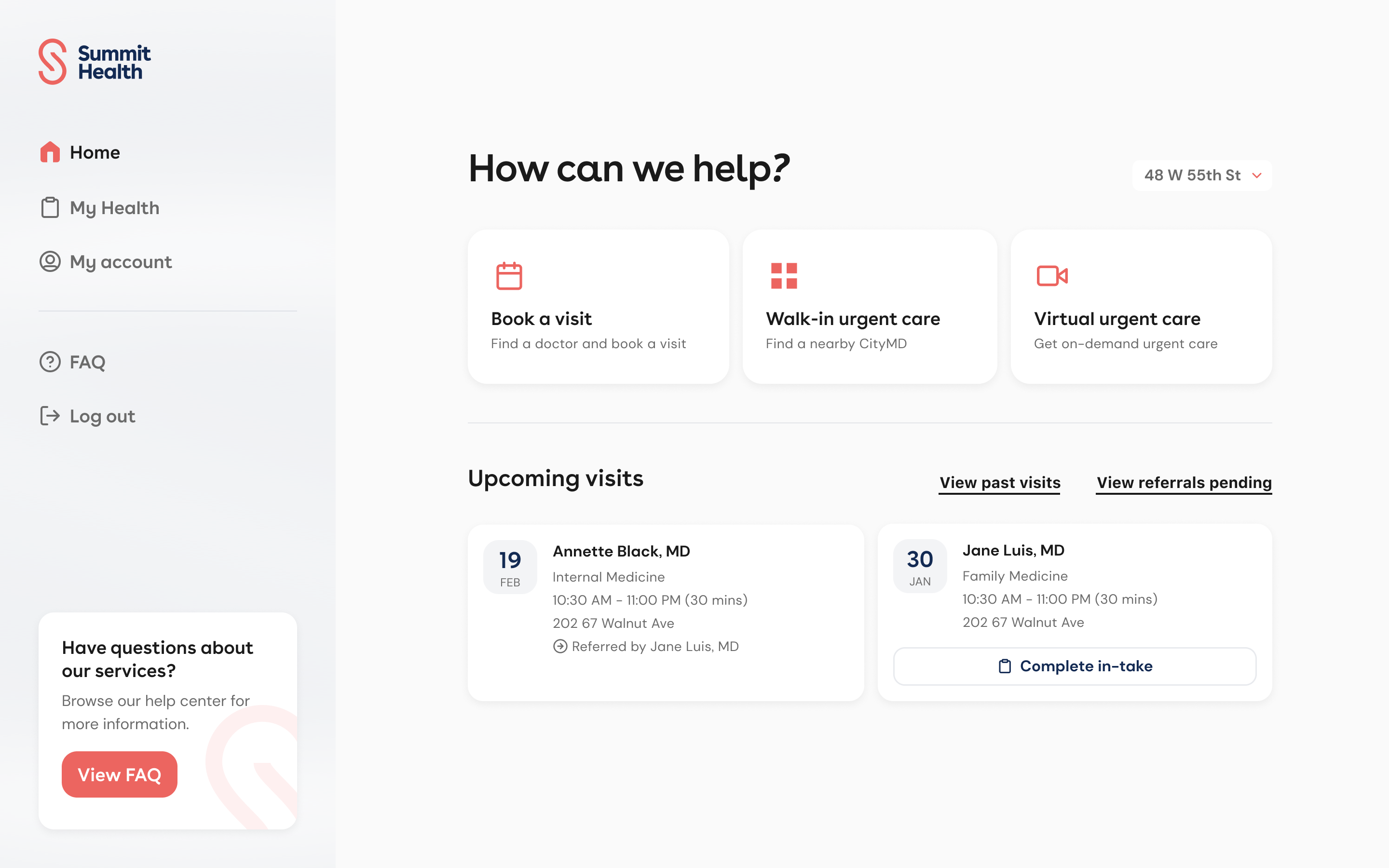
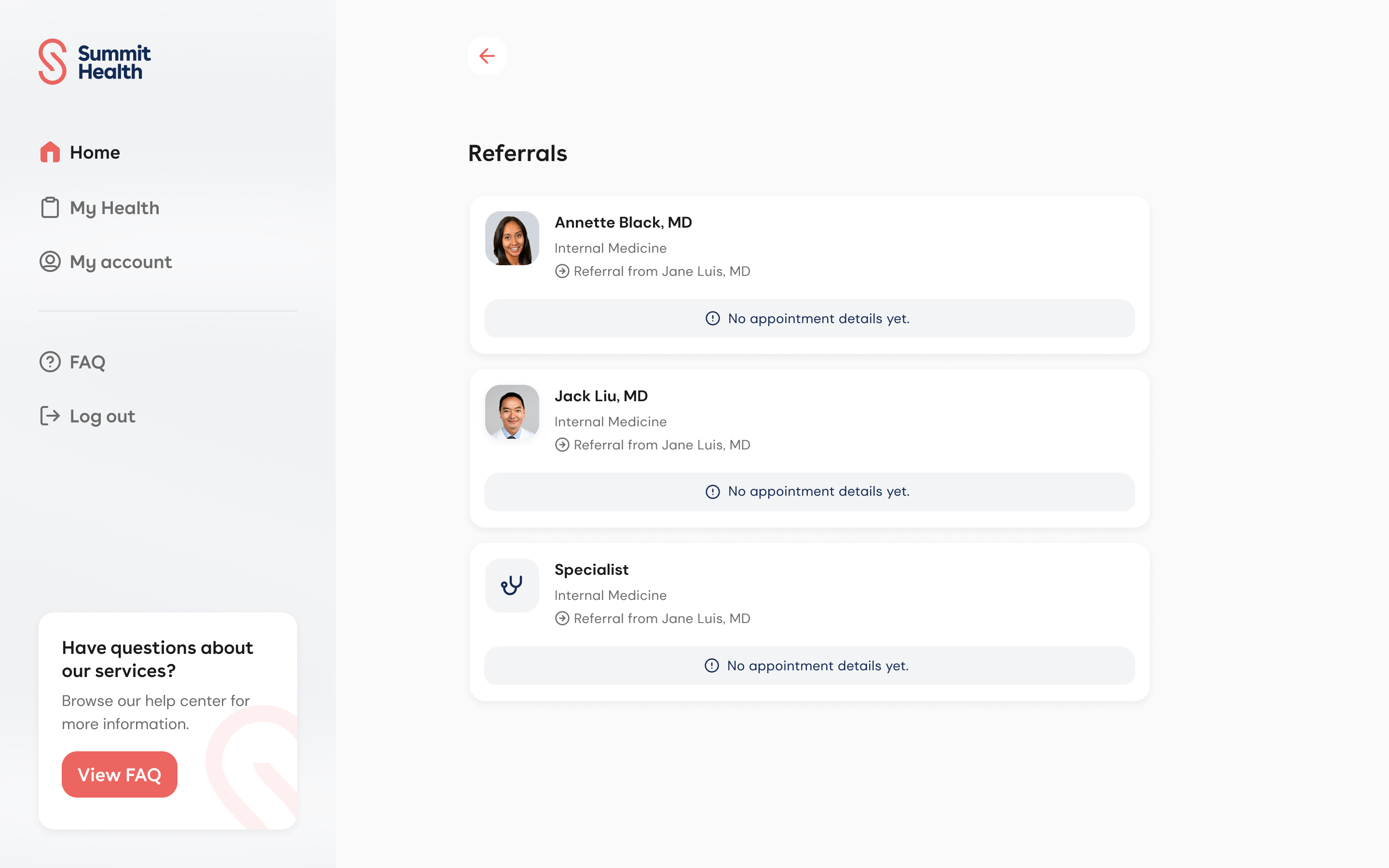
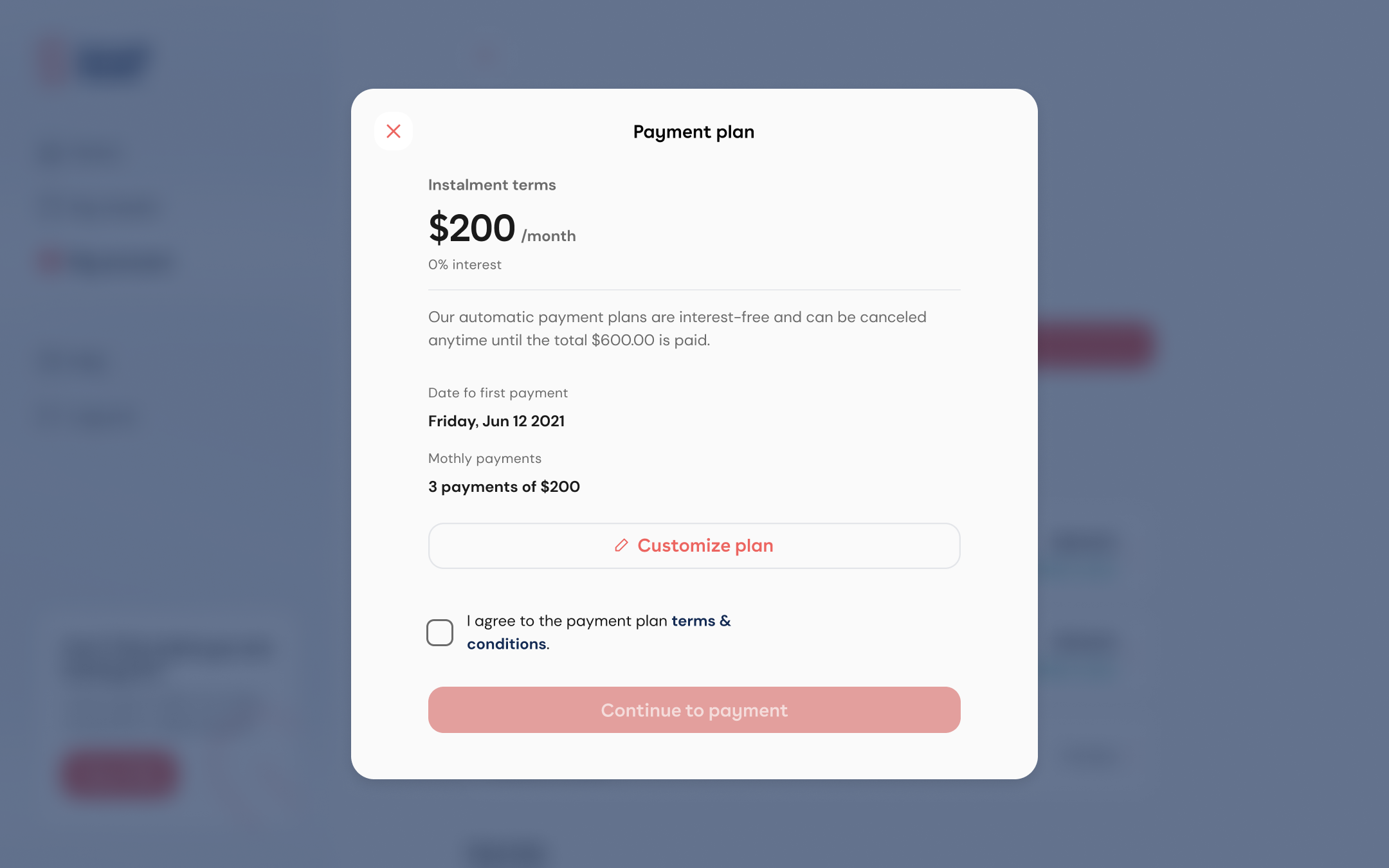
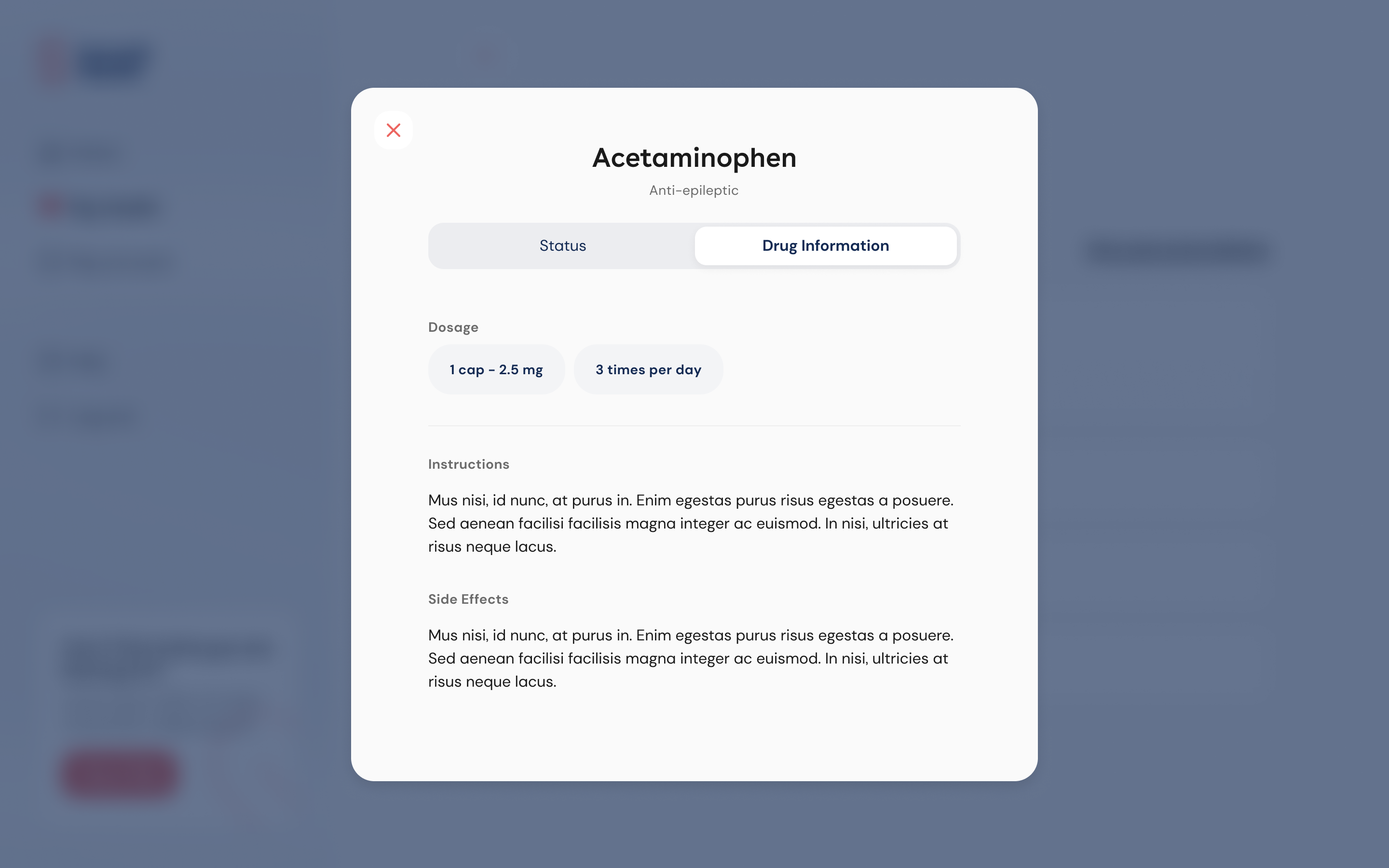
The system had to hold up on the patient portal, not just the apps. Same tokens, same buttons, same cards, same form fields. Desktop just had more room.
Home is action cards plus appointment cards. Referrals is that card again, stacked as a list. Payments and medication detail are the form and button components inside a modal. None of these screens were custom one-offs. They were the library at web density, so a coral primary on the portal was the same component as the one on iOS.
Impact & results
Development efficiency
We tracked this through Jira and Jira Align. More tickets were getting completed in faster turnaround times, around 20-30% reduction in development time. Engineers could implement features significantly faster using pre-built, tested components instead of building from scratch.
System adoption
We shipped 10 core components in the initial release. Multiple product teams started adopting the system, and we established a foundation we could keep building on.
Consistency improvements
Unified visual language across mobile and web. Predictable user experience across all patient touchpoints. Reduced design debt and technical inconsistencies.
Challenges & learnings
Getting people familiar with design systems
I think people at the time weren't as familiar with design systems, both designers and engineers to some degree. Summit had a small component library but hadn't really built out something extensive. The engineers understood pretty quickly once we got going. They could see the benefit and the proper approach. But it required education and showing value, not just announcing "here's a design system."
The workload
Building a design system from scratch is a lot of work. You're starting from nothing, but that also gives you the opportunity to define everything and really set the foundation forward. What kept me up was just getting everything done. There's so much to build, document, and coordinate.
Timeline & team
6 months from research to initial launch. I worked with 2 other designers and collaborated closely with 4-6 engineers, plus product management for prioritization.
Phases: Research & Discovery (1 month), Foundation & Core Components (2 months), Implementation & Testing (2 months), Documentation & Launch (1 month).